


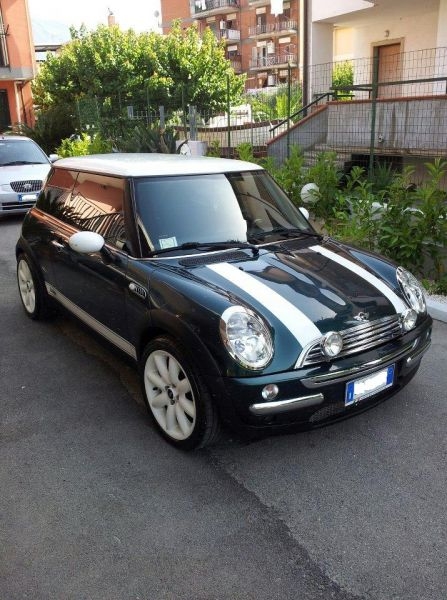
la mia mini
Album creato da
themas ·
Aggiornato
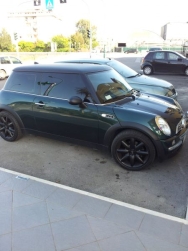
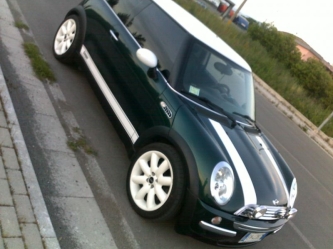
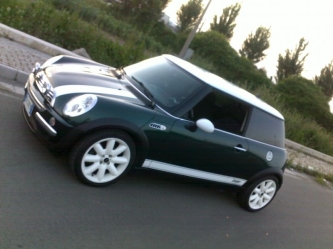
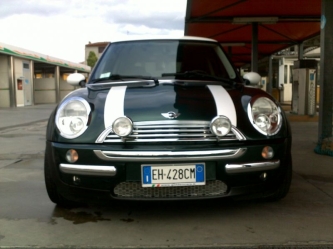
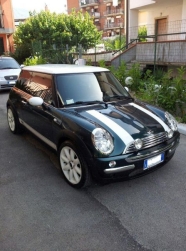
la mia mini dopo varie modifiche...ve le elenco
exterior:
oscuramento vetri totale
bonnet bianche
stripes bianche con scritta cooper retro'
faretti wipac
adesivo post logo mini cooper alloro
adesivo tappo serbatoio alloro
colorazione bianca cerchi calotte
riduzione antenna originale
distanziali sia ant che post
sostitu porta frecce orig con quelle cromate
sostit pacchetto luci cn luci bianche
interior:
pacchetto luci sostituz con luci bianche
bracciolo
autoradio cn schermo da tre pollici
motore:
mappa
filtro aria
exterior:
oscuramento vetri totale
bonnet bianche
stripes bianche con scritta cooper retro'
faretti wipac
adesivo post logo mini cooper alloro
adesivo tappo serbatoio alloro
colorazione bianca cerchi calotte
riduzione antenna originale
distanziali sia ant che post
sostitu porta frecce orig con quelle cromate
sostit pacchetto luci cn luci bianche
interior:
pacchetto luci sostituz con luci bianche
bracciolo
autoradio cn schermo da tre pollici
motore:
mappa
filtro aria

0 Album Comments
Non ci sono commenti da visualizzare.