Vai al contenuto
View in the app

A better way to browse. Learn more.

mega MINI forum

A full-screen app on your home screen with push notifications, badges and more.

To install this app on iOS and iPadOS
  1. Tap the Share icon in Safari
  2. Scroll the menu and tap Add to Home Screen.
  3. Tap Add in the top-right corner.
To install this app on Android
  1. Tap the 3-dot menu (⋮) in the top-right corner of the browser.
  2. Tap Add to Home screen or Install app.
  3. Confirm by tapping Install.

Giuseppemancu

Utente forum
  • Iscritto

  • Ultima visita

Tutti i contenuti di Giuseppemancu

  1. Anche io ho la stessa portiera... come si smonta?
  2. Giuseppemancu ha risposto a fgioia nella discussione Sound
    News su come smontare la portiera?
  3. Si lo so ma è molto costoso alla bmw... se ci sono riusciti altre persone perché nn dovrei io.... ci vorrebbe qualkuno ke mi aiutasse a trovare il file per aggiornarlo....ecco la mia versione attuale .... aiutoooo
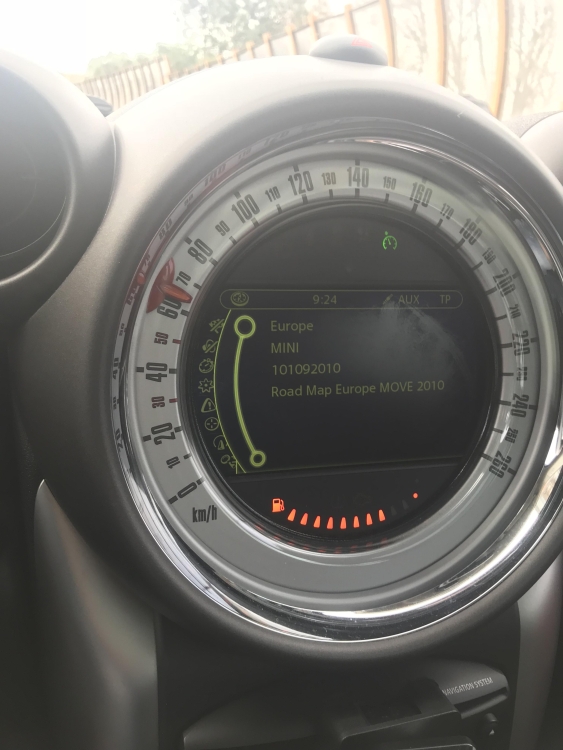
  4. Hai ragione ma come devo fare per poter modificare la mia mappa de 2010 ?
  5. Potresti aiutarmi?
  6. Ciao a tutti mi presento sono Giuseppe e sn di Napoli, chiedo aiuto per aggiornare la mia mappa, e del 2010 come devo fare? Grazie mille a tutti

Account

Navigation

Cerca

Cerca

Configure browser push notifications

Chrome (Android)
  1. Tap the lock icon next to the address bar.
  2. Tap Permissions → Notifications.
  3. Adjust your preference.
Chrome (Desktop)
  1. Click the padlock icon in the address bar.
  2. Select Site settings.
  3. Find Notifications and adjust your preference.