born_to_be_MINI
Utente forum
-
Iscritto
-
Ultima visita
Tutti i contenuti di born_to_be_MINI
-
certo!!! Appena ho notizie posto subito tutto qui!!Ciao raga!! Vorrei informarvi che per sabato 8 Maggio si sta organizzando un giro fra ministi in giornata qui in veneto! Per ora il programma provvisorio è questo: ritrovo a Vicenza per le 9.30-10.00 pranzo a Valdobbiadene per le 13.30 dopo di chè si farà un giro alla fiera che si tiene da quelle parti più un percorso che è in progettazione! News definitive nei prossimi giorni!!! :new_05:nooo cavoli se l'avessi saputo prima! >.<
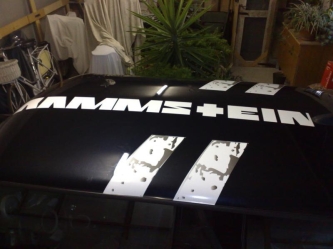 Ciao!! Beh innanzitutto l'adesivo l'ho fatto fare a parma da alcuni amici di un ragazzo che conosco, e fanno x lavoro adesivi per macchine! La scritta vuol dire Rammstein (è la mia band preferita) e la grafica l'ho presa da un loro cd e riadattata x il tetto della mini! ;)
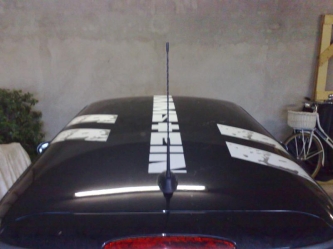
Dall'album: Vecchia e nuova assieme!
Dall'album: Vecchia e nuova assieme!
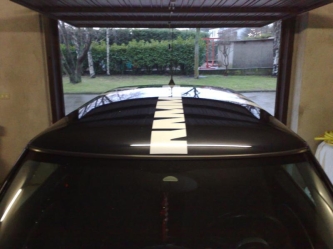
Dall'album: Vecchia e nuova assieme!

Dall'album: Vecchia e nuova assieme!
caspita ke stradina piccola!!Account
Navigation
Cerca
Configure browser push notifications
Chrome (Android)
- Tap the lock icon next to the address bar.
- Tap Permissions → Notifications.
- Adjust your preference.
Chrome (Desktop)
- Click the padlock icon in the address bar.
- Select Site settings.
- Find Notifications and adjust your preference.
Safari (iOS 16.4+)
- Ensure the site is installed via Add to Home Screen.
- Open Settings App → Notifications.
- Find your app name and adjust your preference.
Safari (macOS)
- Go to Safari → Preferences.
- Click the Websites tab.
- Select Notifications in the sidebar.
- Find this website and adjust your preference.
Edge (Android)
- Tap the lock icon next to the address bar.
- Tap Permissions.
- Find Notifications and adjust your preference.
Edge (Desktop)
- Click the padlock icon in the address bar.
- Click Permissions for this site.
- Find Notifications and adjust your preference.
Firefox (Android)
- Go to Settings → Site permissions.
- Tap Notifications.
- Find this site in the list and adjust your preference.
Firefox (Desktop)
- Open Firefox Settings.
- Search for Notifications.
- Find this site in the list and adjust your preference.