


betta
Utente forum
-
Iscritto
-
Ultima visita
-
 no..vernice! un mio amico fa il carrozziere e mi ha verniciato il tetto quasi gratis! ma poi a parte il prezzo è bravissimo e super scrupoloso, quindi alla fine ho deciso di farlo verniciare!
 -
Grazie!! Ancora qualche accorgimento (cromato!!) e poi sarà perfetta!
-
-
 Grazie! Ma non ho fatto io ovviamente!!! Per il tetto chiederò sicuramente a te! Grazie ancora di tutto!
 -
 dici? è che lasciarla senza dava un'idea di incompleto!
 -
per le bonnet senti "dress your mini" lo trovi nella sezione sponsor del forum!! ce ne sono di tutti i tipi! ciao!!!
-
l'idea era quella di farlo verniciare ma mi hanno giusto consigliato il wrapping per lo stesso motivo.. lo farò dopo l'estate però!
-
molte grazie!!! carine vero??!! il prossimo step è il tetto bianco..
-
 eh lo so..pensero' anche a quelli..mi sono fatta consigliare male.. per ora aspetto le bonnet che dovrebbero essere in spedizione!!! mini in progress! ciao!
 -
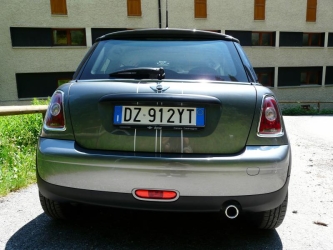
Buongiorno a tutti, mi chiamo Elisabetta ho 29 anni e sono di Cremona. La mia Mini Ray D ha 4 mesi..non scenderei mai!!! Mi sono accorta ora di non avere neanche una foto da caricare! Uff..provvederò al più presto! Cmq è Dark Silver con gli specchietti bianchi + Side Scuttle Black Jack..molto carina! Saluti a tutti! ..ecco non è proprio una foto ma è così:




Account
Navigation
Cerca
Configure browser push notifications
Chrome (Android)
- Tap the lock icon next to the address bar.
- Tap Permissions → Notifications.
- Adjust your preference.
Chrome (Desktop)
- Click the padlock icon in the address bar.
- Select Site settings.
- Find Notifications and adjust your preference.
Safari (iOS 16.4+)
- Ensure the site is installed via Add to Home Screen.
- Open Settings App → Notifications.
- Find your app name and adjust your preference.
Safari (macOS)
- Go to Safari → Preferences.
- Click the Websites tab.
- Select Notifications in the sidebar.
- Find this website and adjust your preference.
Edge (Android)
- Tap the lock icon next to the address bar.
- Tap Permissions.
- Find Notifications and adjust your preference.
Edge (Desktop)
- Click the padlock icon in the address bar.
- Click Permissions for this site.
- Find Notifications and adjust your preference.
Firefox (Android)
- Go to Settings → Site permissions.
- Tap Notifications.
- Find this site in the list and adjust your preference.
Firefox (Desktop)
- Open Firefox Settings.
- Search for Notifications.
- Find this site in the list and adjust your preference.