
Skip to content
View in the app

A better way to browse. Learn more.

mega MINI forum

A full-screen app on your home screen with push notifications, badges and more.

To install this app on iOS and iPadOS
  1. Tap the Share icon in Safari
  2. Scroll the menu and tap Add to Home Screen.
  3. Tap Add in the top-right corner.
To install this app on Android
  1. Tap the 3-dot menu (⋮) in the top-right corner of the browser.
  2. Tap Add to Home screen or Install app.
  3. Confirm by tapping Install.

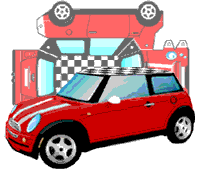
New MINI Paper 1.0.0

(3 reviews)

1 Screenshot

#megaMINIpaperschallenge IO RESTO A CASA
Partecipa anche tu al #megaMINIpaperschallenge
Scarica, stampa, colora e monta la tua mini come più ti piace.
Una volta montata fagli una bella foto e condividila su instagram taggando @megaminiclub, riposteremo tutte le foto nelle nostre stories!


#megaMINIpaperschallenge I STAY HOME
Take part in the #megaMINIpaperschallenge
Download, print, color and assemble your mini as you like.
Once mounted make him a nice photo and share it on instagram by tagging @megaminiclub, we will repost all the photos in our stories!

What's New in Version 1.0.0

Released

No changelog available for this version.

User Feedback


Spettacolare 😀 


Simpatica iniziativa. Scaricata, costruita, fotografata e condivisa. Grazie

   1 of 1 member found this review helpful 1 / 1 member

Gran bella idea. Aiuta a stare a casa, il che in questo momento é decisivo!!! 

Bene. Mi piace.- 

Account

Navigation

Search

Search

Configure browser push notifications

Chrome (Android)
  1. Tap the lock icon next to the address bar.
  2. Tap Permissions → Notifications.
  3. Adjust your preference.
Chrome (Desktop)
  1. Click the padlock icon in the address bar.
  2. Select Site settings.
  3. Find Notifications and adjust your preference.