Daniel
Utente forum
-
Iscritto
-
Ultima visita
Tutti i contenuti di Daniel
-
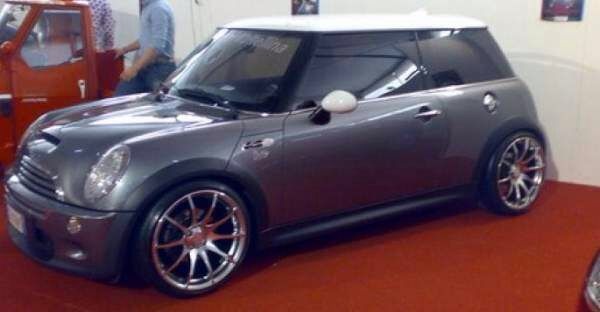
Ho da vendere anche uno stereo 2 din pioneer avhp3100dvdSi per forza.. Anche perché il canale da 17 e per tutti uguale cioè da 8 e l'et anche 35...... Cosa mi puoi dire? Io ho paura di grattare le gomme e di nn poter circolare se porto qualcuno dietroLa foto dei cerchi l'ho scattata io... Mentre quella della mini grigia l'ho scaricata per farti capire l'impatto visivo La mia Cooper S e azzurra cmq Che ne pensi????? a me fanno impazzire, sono estremi in tutti i sensiCiao ragazzi, sono nuovissimo del forum, mi chiamo daniel parto a salutarvi tutti
Account
Navigation
Cerca
Configure browser push notifications
Chrome (Android)
- Tap the lock icon next to the address bar.
- Tap Permissions → Notifications.
- Adjust your preference.
Chrome (Desktop)
- Click the padlock icon in the address bar.
- Select Site settings.
- Find Notifications and adjust your preference.
Safari (iOS 16.4+)
- Ensure the site is installed via Add to Home Screen.
- Open Settings App → Notifications.
- Find your app name and adjust your preference.
Safari (macOS)
- Go to Safari → Preferences.
- Click the Websites tab.
- Select Notifications in the sidebar.
- Find this website and adjust your preference.
Edge (Android)
- Tap the lock icon next to the address bar.
- Tap Permissions.
- Find Notifications and adjust your preference.
Edge (Desktop)
- Click the padlock icon in the address bar.
- Click Permissions for this site.
- Find Notifications and adjust your preference.
Firefox (Android)
- Go to Settings → Site permissions.
- Tap Notifications.
- Find this site in the list and adjust your preference.
Firefox (Desktop)
- Open Firefox Settings.
- Search for Notifications.
- Find this site in the list and adjust your preference.