ghido83
Utente forum
-
Iscritto
-
Ultima visita
Tutti i contenuti di ghido83
-
E sono venute bene? Io dovrei fare il profilo griglia ma devo trovare uno bravoSpettacolo!! :oleeeeee: :oleeeeee:
 spettacolo!!
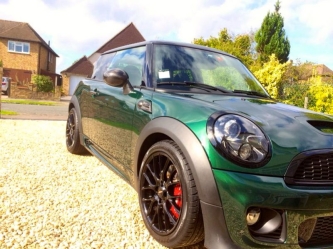 Spettacolare!!io aspetto che esca il completo regolabile della kw anzi se qualcuno sa delle novità dite pure!!Ciao a tutti ragazzi...questo è il mio primo forum e da qualche mese è arrivata la mia prima MINI COOPER S F56...fantastica è dire poco....spero di trovare in questo forum tanti spunti per poter fare alcune modifiche che ho in mente =))) a presto!! appena riesco metto delle foto della bimba :oleeeeee: :oleeeeee:
Account
Navigation
Cerca
Configure browser push notifications
Chrome (Android)
- Tap the lock icon next to the address bar.
- Tap Permissions → Notifications.
- Adjust your preference.
Chrome (Desktop)
- Click the padlock icon in the address bar.
- Select Site settings.
- Find Notifications and adjust your preference.
Safari (iOS 16.4+)
- Ensure the site is installed via Add to Home Screen.
- Open Settings App → Notifications.
- Find your app name and adjust your preference.
Safari (macOS)
- Go to Safari → Preferences.
- Click the Websites tab.
- Select Notifications in the sidebar.
- Find this website and adjust your preference.
Edge (Android)
- Tap the lock icon next to the address bar.
- Tap Permissions.
- Find Notifications and adjust your preference.
Edge (Desktop)
- Click the padlock icon in the address bar.
- Click Permissions for this site.
- Find Notifications and adjust your preference.
Firefox (Android)
- Go to Settings → Site permissions.
- Tap Notifications.
- Find this site in the list and adjust your preference.
Firefox (Desktop)
- Open Firefox Settings.
- Search for Notifications.
- Find this site in the list and adjust your preference.