rudycare
Utente forum
-
Iscritto
-
Ultima visita
Tutti i contenuti di rudycare
-

Dall'album: rudycare r56s
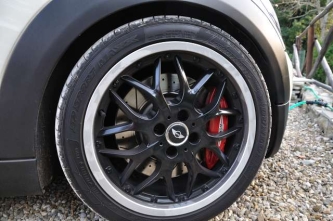
cerchianza nera....fa tanta differenza....purtroppo mi mancano le foto di come è adesso ovvero scarico challenge ufficiale:-))) e volante jcw pelle e alcantara con le tre placchete in carbo...una goduria infinita...:-))) prometto che se il WE è tempo bello faccio le foto....come si deve non copme queste che son fatte al volo...:-)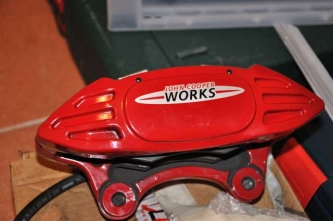
Dall'album: rudycare r56s
Dall'album: rudycare r56s
l'anteriore dei jcw con disco forato e baffato....frenano che è una meraviglia!!!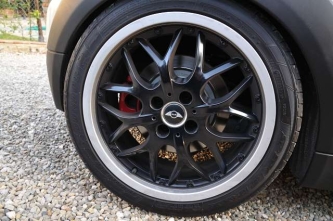
Dall'album: rudycare r56s
....beh il primo vero up di sostanza....freni jcw con tubi in treccia...Jack ti lovvo:-)))))
Dall'album: rudycare r56s
una settimana dopo il ritiro...mugello!!!!:-)))
Dall'album: rudycare r56s

Dall'album: rudycare r56s
...la minella dopo 3 settimane che l'avevo ritirata....assetto e scarico...come potete vedere lo scarico è come l'originale, però ha i finalini più alti....molto più belli dell'originale che sembra quasi staccato dall'autose può interessare oppure essere d'aiuto faccio il fotografo, quindi se venisse l'idea di creare un calendario con foto di mini non c'è nessunissino problema!!!Ragazzi???? Firenze, spesso sono n zona stadio!!!!Account
Navigation
Cerca
Configure browser push notifications
Chrome (Android)
- Tap the lock icon next to the address bar.
- Tap Permissions → Notifications.
- Adjust your preference.
Chrome (Desktop)
- Click the padlock icon in the address bar.
- Select Site settings.
- Find Notifications and adjust your preference.
Safari (iOS 16.4+)
- Ensure the site is installed via Add to Home Screen.
- Open Settings App → Notifications.
- Find your app name and adjust your preference.
Safari (macOS)
- Go to Safari → Preferences.
- Click the Websites tab.
- Select Notifications in the sidebar.
- Find this website and adjust your preference.
Edge (Android)
- Tap the lock icon next to the address bar.
- Tap Permissions.
- Find Notifications and adjust your preference.
Edge (Desktop)
- Click the padlock icon in the address bar.
- Click Permissions for this site.
- Find Notifications and adjust your preference.
Firefox (Android)
- Go to Settings → Site permissions.
- Tap Notifications.
- Find this site in the list and adjust your preference.
Firefox (Desktop)
- Open Firefox Settings.
- Search for Notifications.
- Find this site in the list and adjust your preference.