-
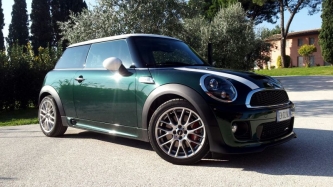
citroen DS3 cosa ne pensate
Cercavo una CAR sempre sportiva stile mini , diesel che consumi poco e che viaggia
-
citroen DS3 cosa ne pensate
Cercavo una CAR sempre sportiva stile mini , diesel che consumi poco e che viaggia
-
citroen DS3 cosa ne pensate
Cercavo qualcosa sui 15 /17 eur e mini non ne trovi a quei prezzi
-
citroen DS3 cosa ne pensate
Comincio ad avere 140 mila km e vorrei venderla x riuscire a prendere qualcosa prima che arrivi a 200 mila km e regalarla.a 2000 eur
-
citroen DS3 cosa ne pensate
Ops io volevo prenderla ! Visto che ne sento parlar bene .. Ovvio che la mini resterà sempre lei ma purtroppo prenderne un'altra mini mi costerebbe troppo
-
citroen DS3 cosa ne pensate
volevo sapere cosa ne pensate della ds3 lo stesso motore della cooper d quello da 115 cv ? pareri come estetica eccc grazieeeeeeee :post-8-1120395257:
-
MINIPalestra
Squot lo faccio anche adesso anche la panca piana ma quella che dici tu adesso no penso che sia uguale
-
MINIPalestra
ragazzi mi serve una mano, adesso cambio palestra il problema è che non ce nessuno che mi prepara una scheda , non ce qualcuno che mi puo aiutare a farne una ?? tenete conto che devo buttar su massaaaaaaa e non sono un esperto per via di nomi particolari di esercizzi :) grazie scrivetemi anche in privato :)
-
problema sprintbooster
strano per me è danneggiato !
-
Idee per Capodanno?
- Mini Ray G potenza
vai di mappa e basta ;)- Idee per Capodanno?
si lavoraa :blush:- 2012 11 17 10.09.54 1
- MINIPalestra
he lo so intanto ringrazio tutti e 2 per i consigli :)- MINIPalestra
- Mini Ray G potenza
Account
Navigation
Cerca
Configure browser push notifications
Chrome (Android)
- Tap the lock icon next to the address bar.
- Tap Permissions → Notifications.
- Adjust your preference.
Chrome (Desktop)
- Click the padlock icon in the address bar.
- Select Site settings.
- Find Notifications and adjust your preference.
Safari (iOS 16.4+)
- Ensure the site is installed via Add to Home Screen.
- Open Settings App → Notifications.
- Find your app name and adjust your preference.
Safari (macOS)
- Go to Safari → Preferences.
- Click the Websites tab.
- Select Notifications in the sidebar.
- Find this website and adjust your preference.
Edge (Android)
- Tap the lock icon next to the address bar.
- Tap Permissions.
- Find Notifications and adjust your preference.
Edge (Desktop)
- Click the padlock icon in the address bar.
- Click Permissions for this site.
- Find Notifications and adjust your preference.
Firefox (Android)
- Go to Settings → Site permissions.
- Tap Notifications.
- Find this site in the list and adjust your preference.
Firefox (Desktop)
- Open Firefox Settings.
- Search for Notifications.
- Find this site in the list and adjust your preference.