
-
Pomello jcw r56 su f56
Ma cuffia a parte si monta senza modifiche sulla f56??
- consigli tappeti invernali e specchio interno
-
Consigli per gli acquisti: F54-F55-F56-F57
ordinata questa settimana,cosi mi è stato detto e c'è anche scritto sul contratto"consegna entro il mese di settembre" probabilmente arriverà ad i primi di ottobre! dove l hai presa ?
-
Consigli per gli acquisti: F54-F55-F56-F57
io ho ordinato da pochi giorni una jcw bianco pepper,tetto e specchi rossi,bonnet jcw,cerchi 18,pacchetto hype,cambio Manuale!! consegna fine settembre,concessionaria "autovanti" Monza
-
Denny81 ha cambiato la sua immagine del profilo
-
Mini Service Inclusive 5y/50.000 km e tagliandi
se prendi la jcw f56 è gratis..
-
Cooper S r56 LCI o F56?
dopo 5 anni di r56 s automatica che ha all attivo 103000 km,qualche problemino l ha avuto(3 pompe alta pressione,ventola raffr. e tendicatena) adesso ho ordinato la f56 jcw...speriamo in bene :-)
-
Consigli per gli acquisti: F54-F55-F56-F57
ok grazie,in più come optional ha quelli con l assistenza alla svolta??
-
Consigli per gli acquisti: F54-F55-F56-F57
ciao ragazzi,che fari ha la jcw f56 di serie ???
-
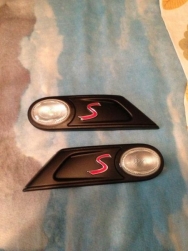
Side Nere
-
Quale Pneumatici usate?
Chi ha provato le hankook ventus v12 evo ???
-

securedownload
-
MINI Cooper S â„¢
-
Eccomi..!!
Grazie a tutti per il benvenuto
- Eccomi..!!
Account
Navigation
Cerca
Configure browser push notifications
Chrome (Android)
- Tap the lock icon next to the address bar.
- Tap Permissions → Notifications.
- Adjust your preference.
Chrome (Desktop)
- Click the padlock icon in the address bar.
- Select Site settings.
- Find Notifications and adjust your preference.
Safari (iOS 16.4+)
- Ensure the site is installed via Add to Home Screen.
- Open Settings App → Notifications.
- Find your app name and adjust your preference.
Safari (macOS)
- Go to Safari → Preferences.
- Click the Websites tab.
- Select Notifications in the sidebar.
- Find this website and adjust your preference.
Edge (Android)
- Tap the lock icon next to the address bar.
- Tap Permissions.
- Find Notifications and adjust your preference.
Edge (Desktop)
- Click the padlock icon in the address bar.
- Click Permissions for this site.
- Find Notifications and adjust your preference.
Firefox (Android)
- Go to Settings → Site permissions.
- Tap Notifications.
- Find this site in the list and adjust your preference.
Firefox (Desktop)
- Open Firefox Settings.
- Search for Notifications.
- Find this site in the list and adjust your preference.
