Albert clubman soho
Utente forum
-
Iscritto
-
Ultima visita
Tutti i contenuti di Albert clubman soho
-
Non si dovrebbero toccare i led a mani nude.. Il corpo in plastica si ma i led noForse l'hai toccato a mani nude e l'hai danneggiato!Sera gente :DAlbert clubman soho ha commentato al immagine della galleria Albert clubman soho in MINI degli utenti
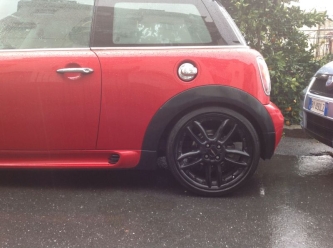 Falle falle che ci stanno ;)Ahahahahah silver godoAlbert clubman soho ha commentato al immagine della galleria Albert clubman soho in MINI degli utenti
che top!! Io farei anche pinze rosse e bordino tipo r113 ;)Ogni misura di gomma è un po' a se.. Certo che avere 2 tipi di gomma diversi tra asse anteriore e posteriore non è il massimo!È un po' tiratina ed esce un po' davanti.. Dietro sarà al limite se non di pochissimo fuori. Poi dipende se gli dai camber eccBuondì :DL'assetto plus non la fa abbassare! Ma queste mini avevano tutte cerchi da 17?Quanti km hai?
Falle falle che ci stanno ;)Ahahahahah silver godoAlbert clubman soho ha commentato al immagine della galleria Albert clubman soho in MINI degli utenti
che top!! Io farei anche pinze rosse e bordino tipo r113 ;)Ogni misura di gomma è un po' a se.. Certo che avere 2 tipi di gomma diversi tra asse anteriore e posteriore non è il massimo!È un po' tiratina ed esce un po' davanti.. Dietro sarà al limite se non di pochissimo fuori. Poi dipende se gli dai camber eccBuondì :DL'assetto plus non la fa abbassare! Ma queste mini avevano tutte cerchi da 17?Quanti km hai?Account
Navigation
Cerca
Configure browser push notifications
Chrome (Android)
- Tap the lock icon next to the address bar.
- Tap Permissions → Notifications.
- Adjust your preference.
Chrome (Desktop)
- Click the padlock icon in the address bar.
- Select Site settings.
- Find Notifications and adjust your preference.
Safari (iOS 16.4+)
- Ensure the site is installed via Add to Home Screen.
- Open Settings App → Notifications.
- Find your app name and adjust your preference.
Safari (macOS)
- Go to Safari → Preferences.
- Click the Websites tab.
- Select Notifications in the sidebar.
- Find this website and adjust your preference.
Edge (Android)
- Tap the lock icon next to the address bar.
- Tap Permissions.
- Find Notifications and adjust your preference.
Edge (Desktop)
- Click the padlock icon in the address bar.
- Click Permissions for this site.
- Find Notifications and adjust your preference.
Firefox (Android)
- Go to Settings → Site permissions.
- Tap Notifications.
- Find this site in the list and adjust your preference.
Firefox (Desktop)
- Open Firefox Settings.
- Search for Notifications.
- Find this site in the list and adjust your preference.