


jcwjubilee75
Utente forum
-
Iscritto
-
Ultima visita
Tutti i contenuti di jcwjubilee75
-
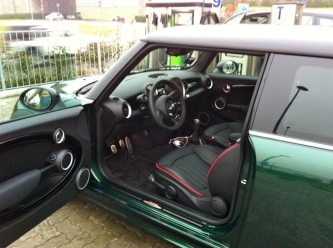 Strumenti supplementari una chicca! Bellissima!
 -
 Molto bella complimenti!!!Io vendo il mio ic della jcw con 4500 km ma nn so se puoi adattarlo... Sent from my iPhone 5 using Tapatalk 2A me piace il chocolate del crack! Sent from my iPhone 5 using Tapatalk 2
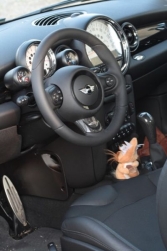 Che volante jcw meraviglioso cambia tutto alla guida!
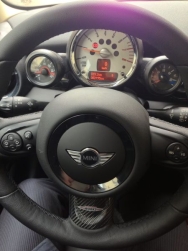 Grande up amico Stefano!!!
 Io son passato dalle rosse di serie tra l altro bellissime a quelle in carbonio. Io il carbonio nn lo toccherei,per richiamare il rosso del bordino andrei di prese d aria freni anteriori rosse! Dai su Pippo cassssssso!
interessanti quei cerchi....Anche Silver col suo nuovo dp avrebbe rimorchiato,soprattutto i 2 bisonti! Ahahah Sent from my iPhone 5 using Tapatalk 2La nuova m5 monta il v8 con 2 turbo e spinge piu della precedente v10 aspirato,la pagani huayra monta motore turbo mercedes... Sent from my iPhone 5 using Tapatalk 2Sono Prove inutili ,conta la pista e poi mancano delle auto ( agera / huayra etc. ) Sent from my iPhone 5 using Tapatalk 2Monta un bel dp milltek 200 celle ed uno step 2 possibilmente vecchio modello associato a benzina 100 ottani.., Sent from my iPhone 5 using Tapatalk 2
Io son passato dalle rosse di serie tra l altro bellissime a quelle in carbonio. Io il carbonio nn lo toccherei,per richiamare il rosso del bordino andrei di prese d aria freni anteriori rosse! Dai su Pippo cassssssso!
interessanti quei cerchi....Anche Silver col suo nuovo dp avrebbe rimorchiato,soprattutto i 2 bisonti! Ahahah Sent from my iPhone 5 using Tapatalk 2La nuova m5 monta il v8 con 2 turbo e spinge piu della precedente v10 aspirato,la pagani huayra monta motore turbo mercedes... Sent from my iPhone 5 using Tapatalk 2Sono Prove inutili ,conta la pista e poi mancano delle auto ( agera / huayra etc. ) Sent from my iPhone 5 using Tapatalk 2Monta un bel dp milltek 200 celle ed uno step 2 possibilmente vecchio modello associato a benzina 100 ottani.., Sent from my iPhone 5 using Tapatalk 2 Davy togli le sport e vai di eibach,calotte specchietti nere
Account
Navigation
Cerca
Configure browser push notifications
Chrome (Android)
- Tap the lock icon next to the address bar.
- Tap Permissions → Notifications.
- Adjust your preference.
Chrome (Desktop)
- Click the padlock icon in the address bar.
- Select Site settings.
- Find Notifications and adjust your preference.
Safari (iOS 16.4+)
- Ensure the site is installed via Add to Home Screen.
- Open Settings App → Notifications.
- Find your app name and adjust your preference.
Safari (macOS)
- Go to Safari → Preferences.
- Click the Websites tab.
- Select Notifications in the sidebar.
- Find this website and adjust your preference.
Edge (Android)
- Tap the lock icon next to the address bar.
- Tap Permissions.
- Find Notifications and adjust your preference.
Edge (Desktop)
- Click the padlock icon in the address bar.
- Click Permissions for this site.
- Find Notifications and adjust your preference.
Firefox (Android)
- Go to Settings → Site permissions.
- Tap Notifications.
- Find this site in the list and adjust your preference.
Firefox (Desktop)
- Open Firefox Settings.
- Search for Notifications.
- Find this site in the list and adjust your preference.
