Vai al contenuto
View in the app

A better way to browse. Learn more.

mega MINI forum

A full-screen app on your home screen with push notifications, badges and more.

To install this app on iOS and iPadOS
  1. Tap the Share icon in Safari
  2. Scroll the menu and tap Add to Home Screen.
  3. Tap Add in the top-right corner.
To install this app on Android
  1. Tap the 3-dot menu (⋮) in the top-right corner of the browser.
  2. Tap Add to Home screen or Install app.
  3. Confirm by tapping Install.

Ciao ragazzi....

Featured Replies

Inviato

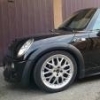
Ciao a tutti......e chi l'avrebbe mai pensato, non sono mai stato un grande amante di mini e invece eccomi qua pure a me :naughty:

una mini copper s r53 (che qualcuno conoscerà già) mi ha conquistato.

Arrivo da un clio rs 197cv con telio cup ma il piacere di guida che mi da questa mini è imbattibile....

Inviato
  • Autore

Ciao a tutti......e chi l'avrebbe mai pensato, non sono mai stato un grande amante di mini e invece eccomi qua pure a me :naughty:

una mini cooper s r53 (che qualcuno conoscerà già) mi ha conquistato.

Arrivo da un clio rs 197cv con telio cup ma il piacere di guida che mi da questa mini è imbattibile....

Appena riesco posto le foto

Modificato da Muay Thai

Inviato

Benvenuto ;)

  • 3 settimane dopo...
Inviato

Benvenuto, si me la ricordo questa mini per quello che ha avuto sotto al cofano.

Account

Navigation

Cerca

Cerca

Configure browser push notifications

Chrome (Android)
  1. Tap the lock icon next to the address bar.
  2. Tap Permissions → Notifications.
  3. Adjust your preference.
Chrome (Desktop)
  1. Click the padlock icon in the address bar.
  2. Select Site settings.
  3. Find Notifications and adjust your preference.