Vai al contenuto
View in the app

A better way to browse. Learn more.

mega MINI forum

A full-screen app on your home screen with push notifications, badges and more.

To install this app on iOS and iPadOS
  1. Tap the Share icon in Safari
  2. Scroll the menu and tap Add to Home Screen.
  3. Tap Add in the top-right corner.
To install this app on Android
  1. Tap the 3-dot menu (⋮) in the top-right corner of the browser.
  2. Tap Add to Home screen or Install app.
  3. Confirm by tapping Install.

Presentazione

Featured Replies

Inviato

Ciao a tutti!!! Sono un nuovo iscritto Toscano. 

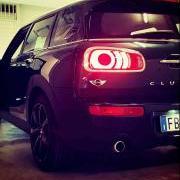
Da un mese ho acquistato la mia prima Mini :clap: Una Clubman F54 one D allestimento Hype. Che dire è una bomba, veramente soddisfatto! 20161222_120227_Fotor.jpg


Msg del mod. wwleone: corretto lettera modello MINI. :naughty:

Modificato da wwleone
Corretto modello MINI

Inviato
  • Autore

Grazie:new_21:


Inviato

Benvenuto ;)


Serie F non R, se é quella in foto. 

Inviato
1 ora fa, Ciuller dice:

Benvenuto ;)

Serie F non R, se é quella in foto. 

Msg del mod. wwleone: corretto lettera modello MINI. :naughty:

Account

Navigation

Cerca

Cerca

Configure browser push notifications

Chrome (Android)
  1. Tap the lock icon next to the address bar.
  2. Tap Permissions → Notifications.
  3. Adjust your preference.
Chrome (Desktop)
  1. Click the padlock icon in the address bar.
  2. Select Site settings.
  3. Find Notifications and adjust your preference.