Vai al contenuto
View in the app

A better way to browse. Learn more.

mega MINI forum

A full-screen app on your home screen with push notifications, badges and more.

To install this app on iOS and iPadOS
  1. Tap the Share icon in Safari
  2. Scroll the menu and tap Add to Home Screen.
  3. Tap Add in the top-right corner.
To install this app on Android
  1. Tap the 3-dot menu (⋮) in the top-right corner of the browser.
  2. Tap Add to Home screen or Install app.
  3. Confirm by tapping Install.

Nuovo iscritto

Featured Replies

Inviato

Ciao a tutti, mi sono iscritto a questo forum perché sono certo sia quello giusto per condividere una nuova passione: quella per la Mini...

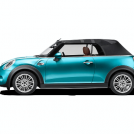
Spero di apprendere questo piccolo grande mondo della mitica Mini, che vorrei acquistare nella versione cabrio, che al momento è quella che più mi attira.

Infatti sto per acquistarne una del 2010... mer  cappotta nera..

Inviato

Benvenuto ;)


Cooper? Cooper S? 

Inviato
  • Autore
20 ore fa, Ciuller dice:

Benvenuto ;)


Cooper? Cooper S? 

Grazie! Trattasi di una Cooper 1.6 benzina...

18 ore fa, Fabrizietto dice:

Benvenuto nel forum!

:clap:

Grazie mille

11 ore fa, wwleone dice:

Ciao benvenuto a te & alla tua futura MINI

Grazie... speriamo che il futuro diventi presente con unala bella mini nel garage :)

Inviato

Ciao!
Io ho preso una cabrio cooper nuova da 10 giorni e ne sono innamorato..quando entri nel mondo mini ne rimani ammaliato :naughty:

Account

Navigation

Cerca

Cerca

Configure browser push notifications

Chrome (Android)
  1. Tap the lock icon next to the address bar.
  2. Tap Permissions → Notifications.
  3. Adjust your preference.
Chrome (Desktop)
  1. Click the padlock icon in the address bar.
  2. Select Site settings.
  3. Find Notifications and adjust your preference.