Vai al contenuto
View in the app

A better way to browse. Learn more.

mega MINI forum

A full-screen app on your home screen with push notifications, badges and more.

To install this app on iOS and iPadOS
  1. Tap the Share icon in Safari
  2. Scroll the menu and tap Add to Home Screen.
  3. Tap Add in the top-right corner.
To install this app on Android
  1. Tap the 3-dot menu (⋮) in the top-right corner of the browser.
  2. Tap Add to Home screen or Install app.
  3. Confirm by tapping Install.

Mi presento

Featured Replies

Inviato

Ciao a tutti ragazzi,

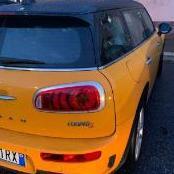
abbandonati definitivamente station wagon e monovolume (i figli sono cresciuti) ho rotto gli indugi e dopo una lunga ricerca sono entrato nel mondo Mini. Ho preso una Clubman S  arancione usata che non riesco a smettere di guardare :-). Come prima cosa mi sono iscritto al forum perchè per me è un mondo completamente nuovo e spero con il vostro aiuto di capirci qualcosa. A presto!

Gianfranco

Inviato

Ciao benvenuto a te e alla tua MINI.


Colore poco usuale sulle F54

Inviato
  • Autore
1 ora fa, wwleone ha scritto:

Ciao benvenuto a te e alla tua MINI.


Colore poco usuale sulle F54

Infatti, e non dico che l'ho scelta per il colore ma quasi 🙂

Inviato
  • Autore

757970218_WhatsAppImage2021-11-03at17_17_20.thumb.jpeg.0124540e4fa6796aef5010e80566b39a.jpeg

Inviato

Benvenuto! Ottima scelta il colore, non se ne vedono tante in giro

Account

Navigation

Cerca

Cerca

Configure browser push notifications

Chrome (Android)
  1. Tap the lock icon next to the address bar.
  2. Tap Permissions → Notifications.
  3. Adjust your preference.
Chrome (Desktop)
  1. Click the padlock icon in the address bar.
  2. Select Site settings.
  3. Find Notifications and adjust your preference.