Classifica
-

wwleone
Moderatore3Punti18.125Numero contenuti -
luka 118d
Utente forum2Punti8.659Numero contenuti -

marcello4895
Moderatore2Punti5.135Numero contenuti -

Giu_85
Utente forum1Punti100Numero contenuti




Contenuto Popolare
Mostra il contenuto con la massima reputazione di 13/12/2024 in Risposte
-
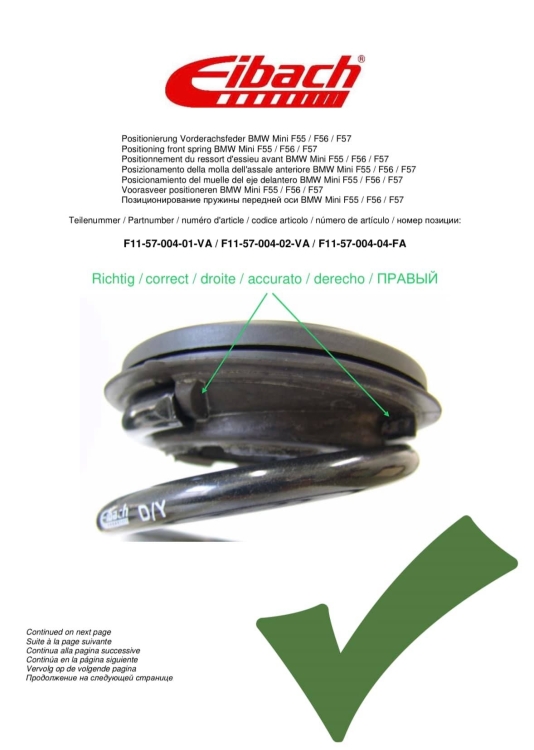
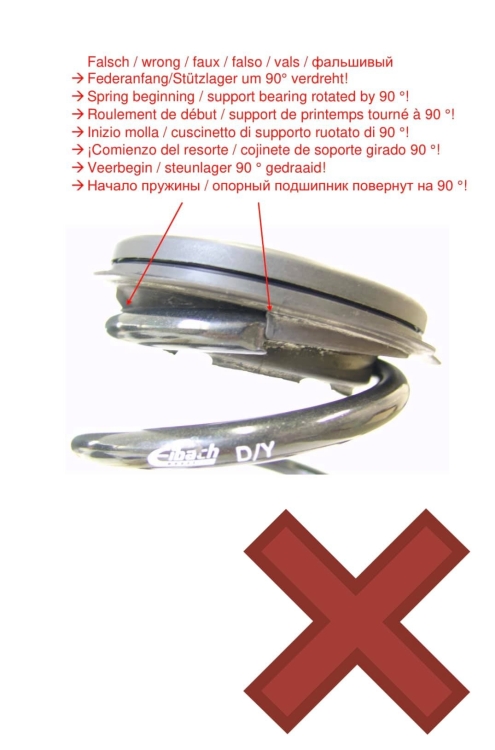
2 puntiFai vedere al tuo meccanico questo (erano per le F56, ma potrebbero andare bene anche per le F60):
 2 punti
 -
1 punto
-
1 punto
-
1 punto
-
1 punto
-
1 punto1 punto1 punto1 puntoAnche i fendinebbia illuminavano il lato strada ma con un’ampia luminosità comunque poco fa ho provato accostandomi ad un muro ed in effetti in d, con il veicolo fermo e roteando il volante ho notato un lieve incremento di luminosità quindi arcano risolto. Funziona. Come sempre grazie a tutti per i preziosi consigli e le informazioni che mi avete fornito1 punto1 puntoSì @Fabry Geims Din, tocco ma non lo portano più (almeno a Firenze). Invece usano cingersi il capo con una corona di alloro.1 punto