



GattoDelleNevi
Socio 2016
-
Iscritto
-
Ultima visita
Tutti i contenuti di GattoDelleNevi
-
ciao e benvenuto! hai preso la nuova f56?
-
secondo me no...non penso sia una questione di "comandi" elettronici o manuali...è questione di clima automatico o manuale. correggetemi se sbaglio..
-
@Mario93
-
benvenuto!
-
Benvenuto!
-
benvenuto! a parte gli specchietti cromati è spettacolare!Ho sbagliato! Scusate volevo scrivere "per SCARICO non si intende..." avrei comunque sbagliato, sorry to everyone! :)Ma per terminale? Non si intende tutto il gruppo terminale/silenziatore + centrale + catalizzatore esclusi collettori? Io comunque avevo inteso ;)
 I fari sono stupendi, le cornici rosse sono stupende
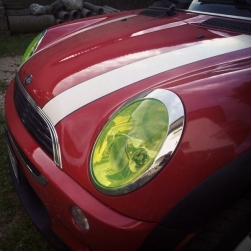 Oh mio dio! Sono veramente stupendi, up spettacolare! ;)
 Bellissimi!Benvenutoooo!
Account
Navigation
Cerca
Configure browser push notifications
Chrome (Android)
- Tap the lock icon next to the address bar.
- Tap Permissions → Notifications.
- Adjust your preference.
Chrome (Desktop)
- Click the padlock icon in the address bar.
- Select Site settings.
- Find Notifications and adjust your preference.
Safari (iOS 16.4+)
- Ensure the site is installed via Add to Home Screen.
- Open Settings App → Notifications.
- Find your app name and adjust your preference.
Safari (macOS)
- Go to Safari → Preferences.
- Click the Websites tab.
- Select Notifications in the sidebar.
- Find this website and adjust your preference.
Edge (Android)
- Tap the lock icon next to the address bar.
- Tap Permissions.
- Find Notifications and adjust your preference.
Edge (Desktop)
- Click the padlock icon in the address bar.
- Click Permissions for this site.
- Find Notifications and adjust your preference.
Firefox (Android)
- Go to Settings → Site permissions.
- Tap Notifications.
- Find this site in the list and adjust your preference.
Firefox (Desktop)
- Open Firefox Settings.
- Search for Notifications.
- Find this site in the list and adjust your preference.

