


guazzo
Utente forum
-
Iscritto
-
Ultima visita
Tutti i contenuti di guazzo
-
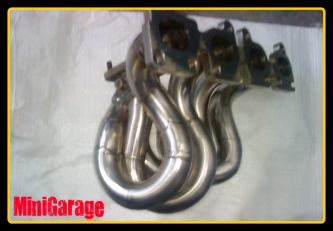 come mai sono così lunghi sti collettori?
 -
secondo me non lo fanno, è un costo per tutti far spostare un evento del genere, contando che ce n'è uno alla settimana li a monza questo evento slitterebbe in estate... coppy digli al sindaco che noi abbiamo tutte macchine omologate EURO5 che non inquinano per niente... :post-8-1120395252:Benvenuto sul forum, davvero gran bel mezzoIo ho lo scarico ALTA completo, dò ragione al Generale perchè anche secondo me lo scarico step1 è il migliore...Io ho montato l'ALTA per gusti personali e perchè credevo in quei famosi grafici visti sui siti... io preferisco stare ad ascoltare a chi prova di persona gli scarichi, chi lavora a stretto contatto con la mini...che stare a sentire a stupide prove sui rulli che dipende sempre se sono tarati bene o male... fidatevi delle persone giuste e non sbaglierete mai niente! :post-8-1120395257:
Account
Navigation
Cerca
Configure browser push notifications
Chrome (Android)
- Tap the lock icon next to the address bar.
- Tap Permissions → Notifications.
- Adjust your preference.
Chrome (Desktop)
- Click the padlock icon in the address bar.
- Select Site settings.
- Find Notifications and adjust your preference.
Safari (iOS 16.4+)
- Ensure the site is installed via Add to Home Screen.
- Open Settings App → Notifications.
- Find your app name and adjust your preference.
Safari (macOS)
- Go to Safari → Preferences.
- Click the Websites tab.
- Select Notifications in the sidebar.
- Find this website and adjust your preference.
Edge (Android)
- Tap the lock icon next to the address bar.
- Tap Permissions.
- Find Notifications and adjust your preference.
Edge (Desktop)
- Click the padlock icon in the address bar.
- Click Permissions for this site.
- Find Notifications and adjust your preference.
Firefox (Android)
- Go to Settings → Site permissions.
- Tap Notifications.
- Find this site in the list and adjust your preference.
Firefox (Desktop)
- Open Firefox Settings.
- Search for Notifications.
- Find this site in the list and adjust your preference.