


David
Utente forum
-
Iscritto
-
Ultima visita
Tutti i contenuti di David
-
la sd andava almeno in parte differenziata.... ci vuoi lasciare i due tubi centrali,ci togli la presa d'aria...vuoi lasciare la presa d'aria,ci metti gli scarichi opposti come il gti... è una cosa senza senso fare due macchine diverse con la stessa estetica..... fatto sta che un auto con quest estetica molto sportiva con sotto un rumore da tractor,ston e non pocoa me con il 184 cv si accende la luce verde e la scritta sport sul contagiri..non mi garba...però che parco auto dalle targhe sembrano francesi,non vorrei sbagliarmi
 non ci credo....hai messo tutta quella roba sulla targa quando potevi modificarla con un programma di grafica? oh mio dio..sei un GENIO
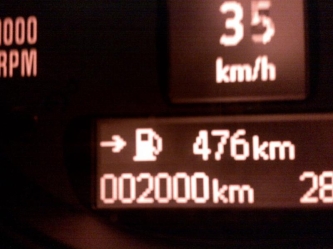 anche io sto iniziando a tirarla bene che sono a 1200 km...
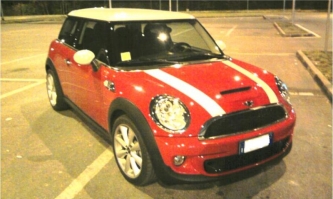 grazie se se,apena aria la bela stasu,le fom incontrà le auto...
si oscar...con il kit aereo come la tua è favolosa..secondo me il kit aereo è particolarmente stupendo sulla rossa e pepper..
i listelli ok..ma le cromature nere intorno ai fari non mi garbano..secondo me diventa troppo pesante...
grazie se se,apena aria la bela stasu,le fom incontrà le auto...
si oscar...con il kit aereo come la tua è favolosa..secondo me il kit aereo è particolarmente stupendo sulla rossa e pepper..
i listelli ok..ma le cromature nere intorno ai fari non mi garbano..secondo me diventa troppo pesante...Account
Navigation
Cerca
Configure browser push notifications
Chrome (Android)
- Tap the lock icon next to the address bar.
- Tap Permissions → Notifications.
- Adjust your preference.
Chrome (Desktop)
- Click the padlock icon in the address bar.
- Select Site settings.
- Find Notifications and adjust your preference.
Safari (iOS 16.4+)
- Ensure the site is installed via Add to Home Screen.
- Open Settings App → Notifications.
- Find your app name and adjust your preference.
Safari (macOS)
- Go to Safari → Preferences.
- Click the Websites tab.
- Select Notifications in the sidebar.
- Find this website and adjust your preference.
Edge (Android)
- Tap the lock icon next to the address bar.
- Tap Permissions.
- Find Notifications and adjust your preference.
Edge (Desktop)
- Click the padlock icon in the address bar.
- Click Permissions for this site.
- Find Notifications and adjust your preference.
Firefox (Android)
- Go to Settings → Site permissions.
- Tap Notifications.
- Find this site in the list and adjust your preference.
Firefox (Desktop)
- Open Firefox Settings.
- Search for Notifications.
- Find this site in the list and adjust your preference.
