


David
Utente forum
-
Iscritto
-
Ultima visita
Tutti i contenuti di David
-
ragass...non ho il garage..ma un enorme portico in legno...quindi la macchina per quanto riguarda intemperie,freddo,gelo,sole è a posto.... ma ci sono parecchi gatti in zona,che di notte,sentendo il calore delle auto,si accovacciano sopra...cosa potrei metterci sopra? dei normali teli possono andare bene? perchè non vorrei spendere 250 euro per la coperta della mini 🙂non l'ho ancora tiracchiata per bene..e pur essendo legata è una bomba....ieri sono andato via ad una cooper..ero in 6...a 90 km/h...chiaramente non picchio giu tutto l'acceleratore... per me rispetto alla 175 cv...nelle marce alte..non c'è nè.....veramente una bomba..dentro silenziosissima come piace a me...con il tasto sport tira delle castagne alluncinanti..veramente forti....
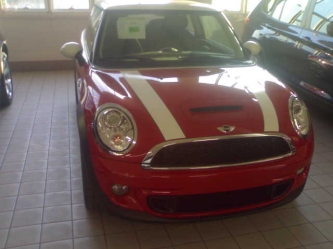 grazie min :)cippy ma a me sembra di non aver visto il tasto dsc...O_O non è che si sono dimenticati di metterlo? è possibile O__O ?
grazie a tutti
grazie min :)cippy ma a me sembra di non aver visto il tasto dsc...O_O non è che si sono dimenticati di metterlo? è possibile O__O ?
grazie a tutti
Dall'album: David
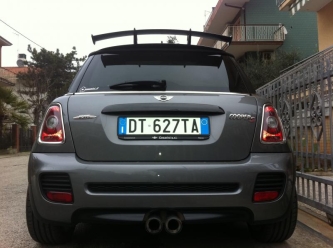 bellissima,il dark silver è uno dei colori più belli...veramente bella...ma l'alettone è quello della works? perchè non hai messo il challenge?io in folle la macchina non la metto quasi mai....comunque come si fa a disattivare? ma anche quando la mattina la accendo..devo tenere per forza il piede sulla frizione..non basta folle e girare la chiave?si ma il prezzo è altissimo... comunque secondo me ci potrebbe essere una ottima notizia per il sound... la tt diesel 170 cv hanno detto che ha un sound praticamente identico alla benzina...secondo me è probabile che facciano qualcosa di simile anche sulla SD
Account
Navigation
Cerca
Configure browser push notifications
Chrome (Android)
- Tap the lock icon next to the address bar.
- Tap Permissions → Notifications.
- Adjust your preference.
Chrome (Desktop)
- Click the padlock icon in the address bar.
- Select Site settings.
- Find Notifications and adjust your preference.
Safari (iOS 16.4+)
- Ensure the site is installed via Add to Home Screen.
- Open Settings App → Notifications.
- Find your app name and adjust your preference.
Safari (macOS)
- Go to Safari → Preferences.
- Click the Websites tab.
- Select Notifications in the sidebar.
- Find this website and adjust your preference.
Edge (Android)
- Tap the lock icon next to the address bar.
- Tap Permissions.
- Find Notifications and adjust your preference.
Edge (Desktop)
- Click the padlock icon in the address bar.
- Click Permissions for this site.
- Find Notifications and adjust your preference.
Firefox (Android)
- Go to Settings → Site permissions.
- Tap Notifications.
- Find this site in the list and adjust your preference.
Firefox (Desktop)
- Open Firefox Settings.
- Search for Notifications.
- Find this site in the list and adjust your preference.
