Mat90tia
Utente forum
-
Iscritto
-
Ultima visita
Tutti i contenuti di Mat90tia
-
 Molto belli ma non ci azzeccano molto! decisamente meglio neri :)
 -
Bello.. ma sinceramente senza offesa stacca un po male dalla prima alla seconda parte :post-8-1120395257:
-
-

Dall'album: Mat90tia Mini Cooper S r56
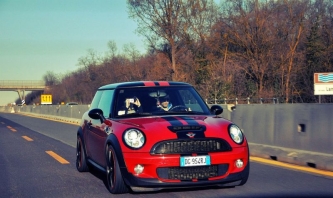
:)
Dall'album: Mat90tia Mini Cooper S r56
In viaggio da Torino :DAnche a me.. stessa cosa.. minaccia rilevata sul forum e non mi fa entrare subito, qualche problema grave?Fortunati voi che vi trovate alle ore 08:00 :) Noi di Torino ci troviamo alle 06:30 :oleeeeee:Ragazzi mancano solo più sette giorni!! :oleeeeee: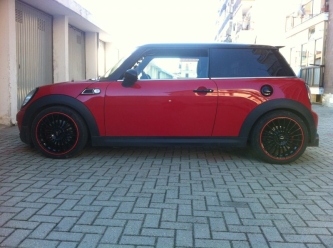 Esatto, Eibach con Ammortizzatori originali :)
Dall'album: Mat90tia Mini Cooper S r56
Ecco qua, come vi sembra?Noi di Torino invece ci troviamo con quelli di Biella a Novara e veniamo su insieme :D64700 ad oggi.. :) Presa a 52000 ad Ottobre 2011Account
Navigation
Cerca
Configure browser push notifications
Chrome (Android)
- Tap the lock icon next to the address bar.
- Tap Permissions → Notifications.
- Adjust your preference.
Chrome (Desktop)
- Click the padlock icon in the address bar.
- Select Site settings.
- Find Notifications and adjust your preference.
Safari (iOS 16.4+)
- Ensure the site is installed via Add to Home Screen.
- Open Settings App → Notifications.
- Find your app name and adjust your preference.
Safari (macOS)
- Go to Safari → Preferences.
- Click the Websites tab.
- Select Notifications in the sidebar.
- Find this website and adjust your preference.
Edge (Android)
- Tap the lock icon next to the address bar.
- Tap Permissions.
- Find Notifications and adjust your preference.
Edge (Desktop)
- Click the padlock icon in the address bar.
- Click Permissions for this site.
- Find Notifications and adjust your preference.
Firefox (Android)
- Go to Settings → Site permissions.
- Tap Notifications.
- Find this site in the list and adjust your preference.
Firefox (Desktop)
- Open Firefox Settings.
- Search for Notifications.
- Find this site in the list and adjust your preference.