


PacoPower
Utente forum
-
Iscritto
-
Ultima visita
Tutti i contenuti di PacoPower
-
-
-
-
 no ai cerchi neri...lasciali bianchi!!!!!
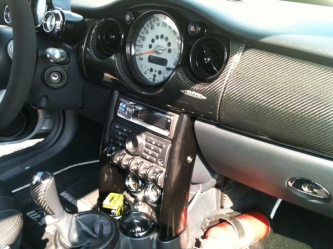 Ma il volante è il JCW ste?? l'ha preso usato?Ragazzi purtroppo avendo avuto la febbre alta e avendo perso 6 preziosissimi giorni di studio non potrò esserci...sono troppo indietro ed ho un esame il 12 e due esami il 19...stavolta passo sperando di potervi rivedere tutti quanto prima! BUON DIVERTIMENTO! :) 1-Matte 6464 + x nn so se viene cone me o con la sua mini hahahaha 3-Benecooper +1 o 2 4-Luigicooper 5-Clabat 6-Alejcw211 7-Marcooper81 8-VdV_iTa + 1 9-MINId 10-Abe333 11-Pi3tro + 2 12-Oscass68 13-IlGenerale (in forse) 14-Ale_l'irreCOOPERabile + 1-2 (forse) 15-Kry90 (forse) 16-manu115hp +2 o 3 17-sese +1 18-beltry84 +3 19-Promez (in forse) 20-Kaiman S 21-emilio 22-Mr_dock +1 23-Marco 27S 24-PASQUALE S


Account
Navigation
Cerca
Configure browser push notifications
Chrome (Android)
- Tap the lock icon next to the address bar.
- Tap Permissions → Notifications.
- Adjust your preference.
Chrome (Desktop)
- Click the padlock icon in the address bar.
- Select Site settings.
- Find Notifications and adjust your preference.
Safari (iOS 16.4+)
- Ensure the site is installed via Add to Home Screen.
- Open Settings App → Notifications.
- Find your app name and adjust your preference.
Safari (macOS)
- Go to Safari → Preferences.
- Click the Websites tab.
- Select Notifications in the sidebar.
- Find this website and adjust your preference.
Edge (Android)
- Tap the lock icon next to the address bar.
- Tap Permissions.
- Find Notifications and adjust your preference.
Edge (Desktop)
- Click the padlock icon in the address bar.
- Click Permissions for this site.
- Find Notifications and adjust your preference.
Firefox (Android)
- Go to Settings → Site permissions.
- Tap Notifications.
- Find this site in the list and adjust your preference.
Firefox (Desktop)
- Open Firefox Settings.
- Search for Notifications.
- Find this site in the list and adjust your preference.