


dade89
Utente forum
-
Iscritto
-
Ultima visita
Tutti i contenuti di dade89
-
Poco fa si è spenta! Devo comunque farla controllare?Sapete dirmi qual'è la spia che si accende quando non funziona bene il kat? Mi è successo poco fa, spia gialla fissa, sul libretto di manutenzione dice poco. Quello che so è che poco tempo fa ho fatto cambiare il kat perchè aveva un problema, tutto questo in BMW, quindi kat originale. C'entra qlcs la mappatura della centralina?
 290 con montaggio... se le monti tu buon lavoro!!!! io non ci penso neanche altrimenti sfascio tutto :-)
ho preso le eibach, ma l'importante è abbassarla!! curiosità..le fai montare o le monti te? io le faccio montare e la spesa totale mi viene 290 euro...può andare?
bene, anche io sulla mia le monto domani le molle!!:-)Quindi non c'è più la speranza di diventare socio per quest'anno?be nel kit c'è anche la pulsantiera i fili con i connettori il cavo obd e poi la disponibilità di Filippo nell'aiutarti per telefono passo passo...io l'ho preso e montato e posso dirti che senza il suo aiuto non sarei riuscito.
290 con montaggio... se le monti tu buon lavoro!!!! io non ci penso neanche altrimenti sfascio tutto :-)
ho preso le eibach, ma l'importante è abbassarla!! curiosità..le fai montare o le monti te? io le faccio montare e la spesa totale mi viene 290 euro...può andare?
bene, anche io sulla mia le monto domani le molle!!:-)Quindi non c'è più la speranza di diventare socio per quest'anno?be nel kit c'è anche la pulsantiera i fili con i connettori il cavo obd e poi la disponibilità di Filippo nell'aiutarti per telefono passo passo...io l'ho preso e montato e posso dirti che senza il suo aiuto non sarei riuscito.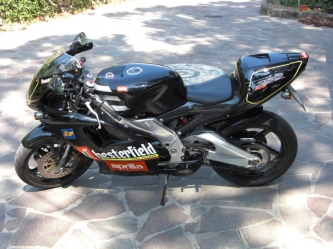 mha
mha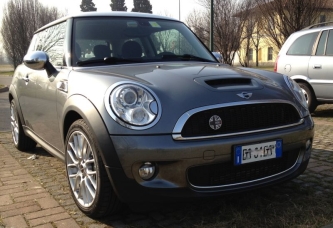 se te lo dico non ci credi! gomme e cerchi!
no no, comprati in bmw nuovi di pacca
no no, li ho comprati con l'idea di farli verniciare di nero!
se te lo dico non ci credi! gomme e cerchi!
no no, comprati in bmw nuovi di pacca
no no, li ho comprati con l'idea di farli verniciare di nero!
Dall'album: Miini e Bmw
Alla fine ho deciso di tenere gli R112 silver e poi un piccolo tocco col nuovo Badge americano!!http://www.motorionline.com/2012/02/29/mini-john-cooper-works-countryman/Account
Navigation
Cerca
Configure browser push notifications
Chrome (Android)
- Tap the lock icon next to the address bar.
- Tap Permissions → Notifications.
- Adjust your preference.
Chrome (Desktop)
- Click the padlock icon in the address bar.
- Select Site settings.
- Find Notifications and adjust your preference.
Safari (iOS 16.4+)
- Ensure the site is installed via Add to Home Screen.
- Open Settings App → Notifications.
- Find your app name and adjust your preference.
Safari (macOS)
- Go to Safari → Preferences.
- Click the Websites tab.
- Select Notifications in the sidebar.
- Find this website and adjust your preference.
Edge (Android)
- Tap the lock icon next to the address bar.
- Tap Permissions.
- Find Notifications and adjust your preference.
Edge (Desktop)
- Click the padlock icon in the address bar.
- Click Permissions for this site.
- Find Notifications and adjust your preference.
Firefox (Android)
- Go to Settings → Site permissions.
- Tap Notifications.
- Find this site in the list and adjust your preference.
Firefox (Desktop)
- Open Firefox Settings.
- Search for Notifications.
- Find this site in the list and adjust your preference.
