Vai al contenuto
View in the app

A better way to browse. Learn more.

mega MINI forum

A full-screen app on your home screen with push notifications, badges and more.

To install this app on iOS and iPadOS
  1. Tap the Share icon in Safari
  2. Scroll the menu and tap Add to Home Screen.
  3. Tap Add in the top-right corner.
To install this app on Android
  1. Tap the 3-dot menu (⋮) in the top-right corner of the browser.
  2. Tap Add to Home screen or Install app.
  3. Confirm by tapping Install.

Buongiorno ragazzi

Featured Replies

Inviato

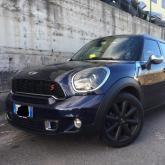
ciao ragazzi, essendomi appena iscritto nel forum, ho il piacere di presentarmi, sono Stefano Battiato ho 20 anni e sono di catania, da qualche mese sono possessore di una stupenda countryman S all4 (manuale purtroppo), dopo aver venduto la mia x5 e70 ho fatto questa decisione. Sono un agente immobiliare e faccio tanti km circa 2mila al mese e devo dire che mi sto trovando molto bene, prestazioni non male, molto comoda in autostrada, e devo dire in città si può girare senza molte difficoltà  ho effettuato piccoli lavoretti fai da te, come cerchi neri (plastidip) e fari anteriori con lenticolare (montato da me) al momento le uniche cose che vorrei installare sono fari xenon originali bmw ( pensavo di comprare i magneti marelli nuovi) e tasto sport! Si accettano consigli... 

66460941225635.jpg

Inviato

Benvenuto ;)

Account

Navigation

Cerca

Cerca

Configure browser push notifications

Chrome (Android)
  1. Tap the lock icon next to the address bar.
  2. Tap Permissions → Notifications.
  3. Adjust your preference.
Chrome (Desktop)
  1. Click the padlock icon in the address bar.
  2. Select Site settings.
  3. Find Notifications and adjust your preference.