Vai al contenuto
View in the app

A better way to browse. Learn more.

mega MINI forum

A full-screen app on your home screen with push notifications, badges and more.

To install this app on iOS and iPadOS
  1. Tap the Share icon in Safari
  2. Scroll the menu and tap Add to Home Screen.
  3. Tap Add in the top-right corner.
To install this app on Android
  1. Tap the 3-dot menu (⋮) in the top-right corner of the browser.
  2. Tap Add to Home screen or Install app.
  3. Confirm by tapping Install.

Salve a tutti!

Featured Replies

Inviato

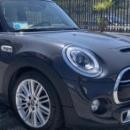
Salve a tutto il Forum! Sono di Roma e posseggo una Mini Cooper S F56. Grey thunder. Cambio automatico! 
Ho iniziato con Mini d’epoca e il fascino della piccola inglese ha lasciato il posto a modelli che evocano le vecchie fattezze e il famoso go kart feeling ancora presente sugli ultimi modelli! Anche se.....si poteva fare qualcosina di più sull’assetto! ☺️
 

un saluto a tutti! 

Inviato
  • Autore
Il 6/12/2020 at 21:16, wwleone ha scritto:

Ciao benvenuto a te e alla tua MINI 

Grazie caro! ☺️

Inviato

Benvenuto! Il sapore delle Mini di "una volta" è unico (per fortuna) ma questo non toglie piacere a quelle attuali

Account

Navigation

Cerca

Cerca

Configure browser push notifications

Chrome (Android)
  1. Tap the lock icon next to the address bar.
  2. Tap Permissions → Notifications.
  3. Adjust your preference.
Chrome (Desktop)
  1. Click the padlock icon in the address bar.
  2. Select Site settings.
  3. Find Notifications and adjust your preference.