



GattoDelleNevi
Socio 2016
-
Iscritto
-
Ultima visita
Tutti i contenuti di GattoDelleNevi
-
@MassiMINI89 lo monta e si trova benissimo
-
Sthea rinnovo i ringraziamenti! Sei gentilissimo! A proposito! Dove lo hai messo l'ampli o hai intenzione di metterlo?
-
BenvenutoooSuperficialità, menefreghismo e pelandronia.Albert ma la tua è una One D??
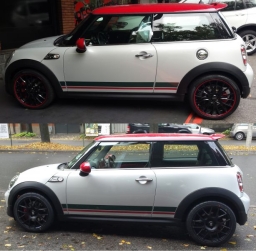 Neanche a me piacciono le strisce quindi le toglierei, ma sicuramente qualcuno ti dirà che sono il tratto distintivo della Jubilee. :)
Hai fatto bene! Sono belli, ma togli le cromature ;) Ma immagino che la foto coi nuovi cerchi sia fatta al lato destro ma poi è stat ruotata? Altrimenti saresti un prestigiatore, hai fatto sparire il serbatoio :DPiccolo OT: ma le F56, o qualunque altro modello di mini dal 2001 ad oggi montano o hanno mai montato le runflat di serie?
Neanche a me piacciono le strisce quindi le toglierei, ma sicuramente qualcuno ti dirà che sono il tratto distintivo della Jubilee. :)
Hai fatto bene! Sono belli, ma togli le cromature ;) Ma immagino che la foto coi nuovi cerchi sia fatta al lato destro ma poi è stat ruotata? Altrimenti saresti un prestigiatore, hai fatto sparire il serbatoio :DPiccolo OT: ma le F56, o qualunque altro modello di mini dal 2001 ad oggi montano o hanno mai montato le runflat di serie? Bella! :) Anche se io non l'avrei presa automatica. Ma scusa hai comprato la macchina senza sapere che assetto montava???!
Account
Navigation
Cerca
Configure browser push notifications
Chrome (Android)
- Tap the lock icon next to the address bar.
- Tap Permissions → Notifications.
- Adjust your preference.
Chrome (Desktop)
- Click the padlock icon in the address bar.
- Select Site settings.
- Find Notifications and adjust your preference.
Safari (iOS 16.4+)
- Ensure the site is installed via Add to Home Screen.
- Open Settings App → Notifications.
- Find your app name and adjust your preference.
Safari (macOS)
- Go to Safari → Preferences.
- Click the Websites tab.
- Select Notifications in the sidebar.
- Find this website and adjust your preference.
Edge (Android)
- Tap the lock icon next to the address bar.
- Tap Permissions.
- Find Notifications and adjust your preference.
Edge (Desktop)
- Click the padlock icon in the address bar.
- Click Permissions for this site.
- Find Notifications and adjust your preference.
Firefox (Android)
- Go to Settings → Site permissions.
- Tap Notifications.
- Find this site in the list and adjust your preference.
Firefox (Desktop)
- Open Firefox Settings.
- Search for Notifications.
- Find this site in the list and adjust your preference.

