Ale_l'irreCOOPERabile
Socio 2014
-
Iscritto
-
Ultima visita
Tutti i contenuti di Ale_l'irreCOOPERabile
-
hahahahahaaaaaaaaaa ecco le compaesane di marco..hahahaha... vai presentane una a pie che cerca moglie...a morte i motori dieselse prendi il ghiera devi buttarla a terra e non avere fisse di toccare....perche se vai di ghiera e abbassi di solo 3cm per estetica, non ha senso.... a sto punto butta su 4 molle e via...ah ahAle_l'irreCOOPERabile ha commentato al immagine della galleria Ale_l'irreCOOPERabile in MINI degli utenti
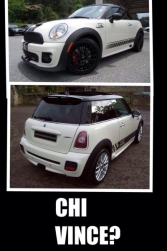 neriwe pie mo non cominciare pure tu come pozzame a fare terrorismo psicologico con le LCI eh... hahaha ora gli LCIisti che erano belli tranquilli e spavaldi con il loro motore bmw, cominceranno a toccarsi hahahah
Account
Navigation
Cerca
Configure browser push notifications
Chrome (Android)
- Tap the lock icon next to the address bar.
- Tap Permissions → Notifications.
- Adjust your preference.
Chrome (Desktop)
- Click the padlock icon in the address bar.
- Select Site settings.
- Find Notifications and adjust your preference.
Safari (iOS 16.4+)
- Ensure the site is installed via Add to Home Screen.
- Open Settings App → Notifications.
- Find your app name and adjust your preference.
Safari (macOS)
- Go to Safari → Preferences.
- Click the Websites tab.
- Select Notifications in the sidebar.
- Find this website and adjust your preference.
Edge (Android)
- Tap the lock icon next to the address bar.
- Tap Permissions.
- Find Notifications and adjust your preference.
Edge (Desktop)
- Click the padlock icon in the address bar.
- Click Permissions for this site.
- Find Notifications and adjust your preference.
Firefox (Android)
- Go to Settings → Site permissions.
- Tap Notifications.
- Find this site in the list and adjust your preference.
Firefox (Desktop)
- Open Firefox Settings.
- Search for Notifications.
- Find this site in the list and adjust your preference.