Albert clubman soho
Utente forum
-
Iscritto
-
Ultima visita
Tutti i contenuti di Albert clubman soho
-
Albert clubman soho ha commentato al immagine della galleria Albert clubman soho in MINI degli utenti
 Black!! ;)
 -
Albert clubman soho ha commentato al immagine della galleria Albert clubman soho in MINI degli utenti
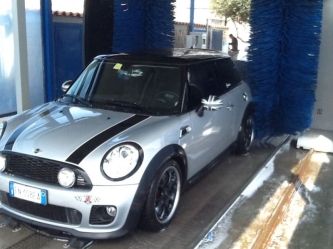 Ma che ve ne frega!!! È più comodo usare il lavaggio automatico!!! ;) Ahahahah
 -
Albert clubman soho ha commentato al immagine della galleria Albert clubman soho in MINI degli utenti
Wow è stupenda!!!! ;)
-
Intendo dire.. Sul contagiri piccolo hai la spia rossa tipo freno a mano sempre accesa?
-
E allora è per quello :)Ho appena ricontrollato e sono 1000€ giusti! Per fortuna c'è lo sconto federclub!! Speriamo ci sia anche l'anno prossimo ;)Se c'è una legge saranno di serie penso!!!Albert clubman soho ha commentato al immagine della galleria Albert clubman soho in MINI degli utenti
 Stupenda veramente!! ;)Che adrenalina, w la mini ;)Avevo visto anche io questo annuncio.. Mi pare bassissimo il prezzo.. Se fosse vero però sarebbe un affare ;)
Account
Navigation
Cerca
Configure browser push notifications
Chrome (Android)
- Tap the lock icon next to the address bar.
- Tap Permissions → Notifications.
- Adjust your preference.
Chrome (Desktop)
- Click the padlock icon in the address bar.
- Select Site settings.
- Find Notifications and adjust your preference.
Safari (iOS 16.4+)
- Ensure the site is installed via Add to Home Screen.
- Open Settings App → Notifications.
- Find your app name and adjust your preference.
Safari (macOS)
- Go to Safari → Preferences.
- Click the Websites tab.
- Select Notifications in the sidebar.
- Find this website and adjust your preference.
Edge (Android)
- Tap the lock icon next to the address bar.
- Tap Permissions.
- Find Notifications and adjust your preference.
Edge (Desktop)
- Click the padlock icon in the address bar.
- Click Permissions for this site.
- Find Notifications and adjust your preference.
Firefox (Android)
- Go to Settings → Site permissions.
- Tap Notifications.
- Find this site in the list and adjust your preference.
Firefox (Desktop)
- Open Firefox Settings.
- Search for Notifications.
- Find this site in the list and adjust your preference.