Albert clubman soho
Utente forum
-
Iscritto
-
Ultima visita
Tutti i contenuti di Albert clubman soho
-
Almeno voi siete capaci a mettere la firma!! Io è da giugno che sono iscritto e ancora nulla!!Ma se uno ha i sedili in tessuto può avere il guscio??Albert clubman soho ha commentato al immagine della galleria Albert clubman soho in MINI degli utenti
 Davide da cosa riesci a vedere che sono replica?Hai foto di tutta una mini??Ma si potrebbe circolare o solo pista?Ciao! Dipende se preferisci il cambio manuale o automatico.. E poi il budget che hai a disposizione ;)Spero tanto ne valga la pena sennò vendo la mini e vado via in bici! :(Il numero 5 mi confermate che devo fare x2? Non è un errore?
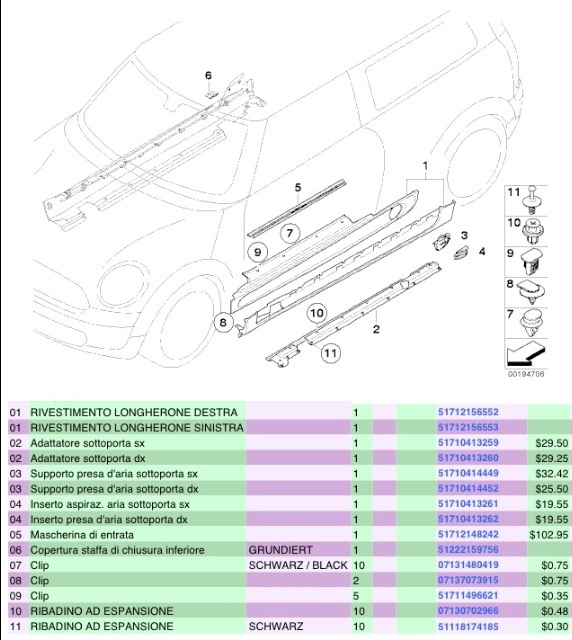
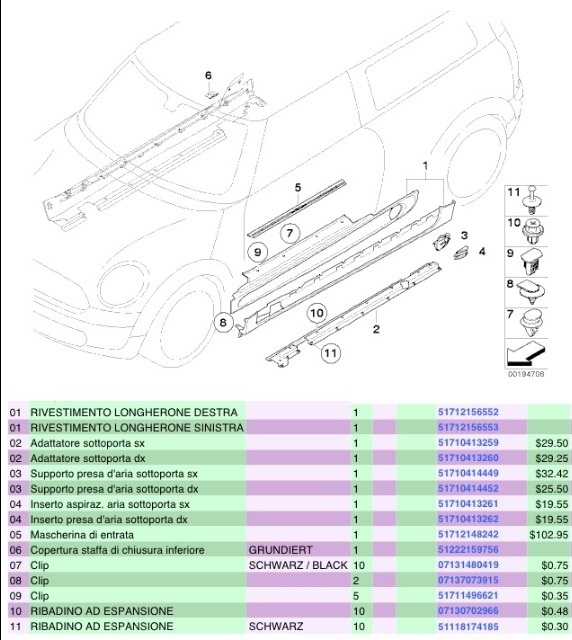 Ragazzi purtroppo sulla foto che ho messo all'inizio non c'è scritto quanto costano solo le gonne! Costano 200 a gonna più tutto il resto! Cazz adesso riguardo perché mi sembrano tantiniQuesta ha il kit aero ahahahah
Account
Navigation
Cerca
Configure browser push notifications
Chrome (Android)
- Tap the lock icon next to the address bar.
- Tap Permissions → Notifications.
- Adjust your preference.
Chrome (Desktop)
- Click the padlock icon in the address bar.
- Select Site settings.
- Find Notifications and adjust your preference.
Safari (iOS 16.4+)
- Ensure the site is installed via Add to Home Screen.
- Open Settings App → Notifications.
- Find your app name and adjust your preference.
Safari (macOS)
- Go to Safari → Preferences.
- Click the Websites tab.
- Select Notifications in the sidebar.
- Find this website and adjust your preference.
Edge (Android)
- Tap the lock icon next to the address bar.
- Tap Permissions.
- Find Notifications and adjust your preference.
Edge (Desktop)
- Click the padlock icon in the address bar.
- Click Permissions for this site.
- Find Notifications and adjust your preference.
Firefox (Android)
- Go to Settings → Site permissions.
- Tap Notifications.
- Find this site in the list and adjust your preference.
Firefox (Desktop)
- Open Firefox Settings.
- Search for Notifications.
- Find this site in the list and adjust your preference.