Gabriele_r50
Utente forum
-
Iscritto
-
Ultima visita
Tutti i contenuti di Gabriele_r50
-
Per quanto riguarda i cerchi vanno bene quelli di tutte le mini dal 2001 ad ora! Esclusi i cerchi della countryman perché sono a 5 fori..
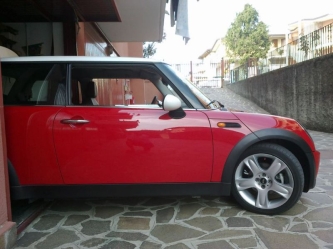 bella, gemme bianche subito! :D
![IMG 0178[1]](https://www.megamini.it/forum/uploads/gallery1/small.gallery_6280_633_1526967.jpg.6b15822febbb2b8942dda637bf4495ec.jpg) stupenda!welcome!
stupenda!welcome! Trentino <3
esatto!
Trentino <3
esatto!
Dall'album: MINI!
un risveglio inaspettato :)io le ho cambiate un mese fa.. pastiglie e sensore.. e senza mettere mano al computer di bordo si è resettata.. è normale?ciao a tutti.. sono da un po' assente sul forum causa lavoro, purtroppo. volevo chiedervi un informazione.. Mi si è accesa la spia dei freni sulla mia r52.. mi sapete dare i codici BMW dei componenti da prendere? (pastiglie, sensori ecc.) Grazie a tutti!Penso che potrebbe essere una buona alternativa modificare una foto con qualche programma di grafica!Welcome! Dicci i tuoi dubbi :)Welcome!Account
Navigation
Cerca
Configure browser push notifications
Chrome (Android)
- Tap the lock icon next to the address bar.
- Tap Permissions → Notifications.
- Adjust your preference.
Chrome (Desktop)
- Click the padlock icon in the address bar.
- Select Site settings.
- Find Notifications and adjust your preference.
Safari (iOS 16.4+)
- Ensure the site is installed via Add to Home Screen.
- Open Settings App → Notifications.
- Find your app name and adjust your preference.
Safari (macOS)
- Go to Safari → Preferences.
- Click the Websites tab.
- Select Notifications in the sidebar.
- Find this website and adjust your preference.
Edge (Android)
- Tap the lock icon next to the address bar.
- Tap Permissions.
- Find Notifications and adjust your preference.
Edge (Desktop)
- Click the padlock icon in the address bar.
- Click Permissions for this site.
- Find Notifications and adjust your preference.
Firefox (Android)
- Go to Settings → Site permissions.
- Tap Notifications.
- Find this site in the list and adjust your preference.
Firefox (Desktop)
- Open Firefox Settings.
- Search for Notifications.
- Find this site in the list and adjust your preference.