Vai al contenuto
View in the app

A better way to browse. Learn more.

mega MINI forum

A full-screen app on your home screen with push notifications, badges and more.

To install this app on iOS and iPadOS
  1. Tap the Share icon in Safari
  2. Scroll the menu and tap Add to Home Screen.
  3. Tap Add in the top-right corner.
To install this app on Android
  1. Tap the 3-dot menu (⋮) in the top-right corner of the browser.
  2. Tap Add to Home screen or Install app.
  3. Confirm by tapping Install.

Ehiii !! Ciao ragazzi !!!!
Featured Replies

Inviato

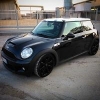
Mi chiamo Vasco e da 3 mesi sono un felice possessore di una mini cooper s r56 del 2007, vengo da Verona ma studio Ingegneria a Milano quindi d' ora in poi potro' usarla solo nei weekend :-( .

Ho gia caricato qualche foto della mia mini , spero vi piaccia.

Ciaooo !!!

Inviato

benvenuto!! seguici su raduni zona vicenza verona ecc!!

Inviato

Welcome

Inviato

Welcome!!!

Inviato

Benvenuto!

Inviato

Benvenuto!

Inviato

Benvenuto!!! Bella belva.. :D

Inviato

benvenutooo!!

proprio carina la tua copeeresse! studio anche io ingegneria al politecnico di milano, tu quale fai??

Inviato
  • Autore

la specialistica ad ingegneria edile-architettura.....Gestione del Costruito...tu??

Inviato
  • Autore

allora hai ancora tanta strada da fare ........... falla cn la mini che ci metti di meno :-)))) in bocca al lupo !!!!

Inviato

bel mezzo!

benvenuto...

Inviato

Benvenuto!! Gran bel mezzo!!

Account

Navigation

Cerca

Cerca

Configure browser push notifications

Chrome (Android)
  1. Tap the lock icon next to the address bar.
  2. Tap Permissions → Notifications.
  3. Adjust your preference.
Chrome (Desktop)
  1. Click the padlock icon in the address bar.
  2. Select Site settings.
  3. Find Notifications and adjust your preference.