Vai al contenuto
View in the app

A better way to browse. Learn more.

mega MINI forum

A full-screen app on your home screen with push notifications, badges and more.

To install this app on iOS and iPadOS
  1. Tap the Share icon in Safari
  2. Scroll the menu and tap Add to Home Screen.
  3. Tap Add in the top-right corner.
To install this app on Android
  1. Tap the 3-dot menu (⋮) in the top-right corner of the browser.
  2. Tap Add to Home screen or Install app.
  3. Confirm by tapping Install.

Presente!

Featured Replies

Inviato

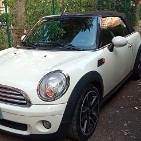
Ciao a tutti, sono un neo possessore di una MINI cooper cabrio R57 del 2009. Acquistata per caso da un concessionario "molto poco affidabile", ma nonostante i tanti problemi che sto risolvendo, con la mia piccola Sally è stato subito amore ! Grazie per il supporto che vorrete darmi nel ripristinare questo piccolo gioiello! 

IMG_20221009_101232.jpg

IMG_20221009_101212.jpg

IMG_20221008_094506.jpg

Inviato

Benvenuto nel forum,saremo lieti di aiutarti e complimenti per la piccola

Modificato da MINIco007

Inviato

Benvenuto! Che bella 😍!

Inviato

Benvenuto, complimenti per la MINI cabrio!

Per i problemi da risolvere non temere che i pregi li ricompensano..

Account

Navigation

Cerca

Cerca

Configure browser push notifications

Chrome (Android)
  1. Tap the lock icon next to the address bar.
  2. Tap Permissions → Notifications.
  3. Adjust your preference.
Chrome (Desktop)
  1. Click the padlock icon in the address bar.
  2. Select Site settings.
  3. Find Notifications and adjust your preference.