Vai al contenuto
View in the app

A better way to browse. Learn more.

mega MINI forum

A full-screen app on your home screen with push notifications, badges and more.

To install this app on iOS and iPadOS
  1. Tap the Share icon in Safari
  2. Scroll the menu and tap Add to Home Screen.
  3. Tap Add in the top-right corner.
To install this app on Android
  1. Tap the 3-dot menu (⋮) in the top-right corner of the browser.
  2. Tap Add to Home screen or Install app.
  3. Confirm by tapping Install.

Presentazione

Featured Replies

Inviato

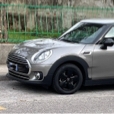
Ciao a tutti. Sono Sergio, da ottobre sono felice possessore di MINI Clubman 1.5 Cooper, F54, del 2017.

Si tratta di una vettura aziendale precedentemente in uso a filiale BMW  di Monaco (D),  importata da in 

Italia da un concessionario locale.  Provengo da una Subaru Impreza guidata per 12 anni e capirete le

le mie perplessità riguardo al motore, ma è un'auto che mi piace così tanto....

Modificato da Vam
Modificata serie come richiesto da utente in altro 3d

Inviato

Ciao Sergio e benvenuto da parte dello Staff del Megamini.

Se vorrai diventare socio del nostro Club, potrai partecipare ai Raduni e beneficiare delle convenzioni per i soci, contribuendo inoltre alle spese di mantenimento di questo forum.

Potrai iscriverti qui:

https://www.megamini.it/forum/index.php?/topic/54273-tesseramento-2023/#comment-920413


Ti invito inoltre a prendere visione del regolamento integrale del forum:

https://www.megamini.it/forum/index.php?/regolamenti/regolamento-forum/


Grazie

Account

Navigation

Cerca

Cerca

Configure browser push notifications

Chrome (Android)
  1. Tap the lock icon next to the address bar.
  2. Tap Permissions → Notifications.
  3. Adjust your preference.
Chrome (Desktop)
  1. Click the padlock icon in the address bar.
  2. Select Site settings.
  3. Find Notifications and adjust your preference.