Vai al contenuto
View in the app

A better way to browse. Learn more.

mega MINI forum

A full-screen app on your home screen with push notifications, badges and more.

To install this app on iOS and iPadOS
  1. Tap the Share icon in Safari
  2. Scroll the menu and tap Add to Home Screen.
  3. Tap Add in the top-right corner.
To install this app on Android
  1. Tap the 3-dot menu (⋮) in the top-right corner of the browser.
  2. Tap Add to Home screen or Install app.
  3. Confirm by tapping Install.

Classifica

Contenuto Popolare

Mostra il contenuto con la massima reputazione di 11/01/2017 in tutte le aree

  1. All'epoca avevo anche io optato per un 17 sia perchè il 18 non mi piacevano, sia perchè sapendo del problema invernali da 18 non era conveniente. Tanto avrei in ogni caso comprato un'altro set.
  2. Per me fare questi discorsi quando non si sa ancora nulla di quando e come sarà è farsi inutili problemi. Li si possono fare se da li a qualche mese esce, ma ora come ora per me sono solo seghe mentali.
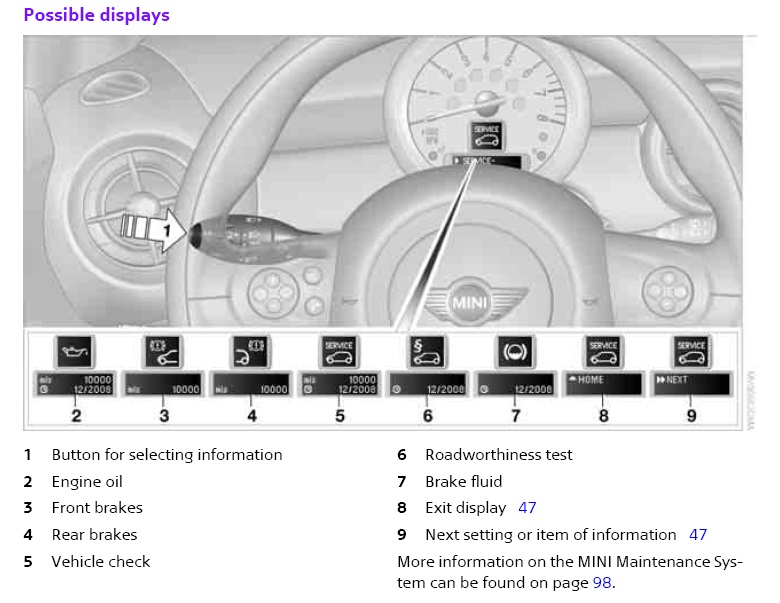
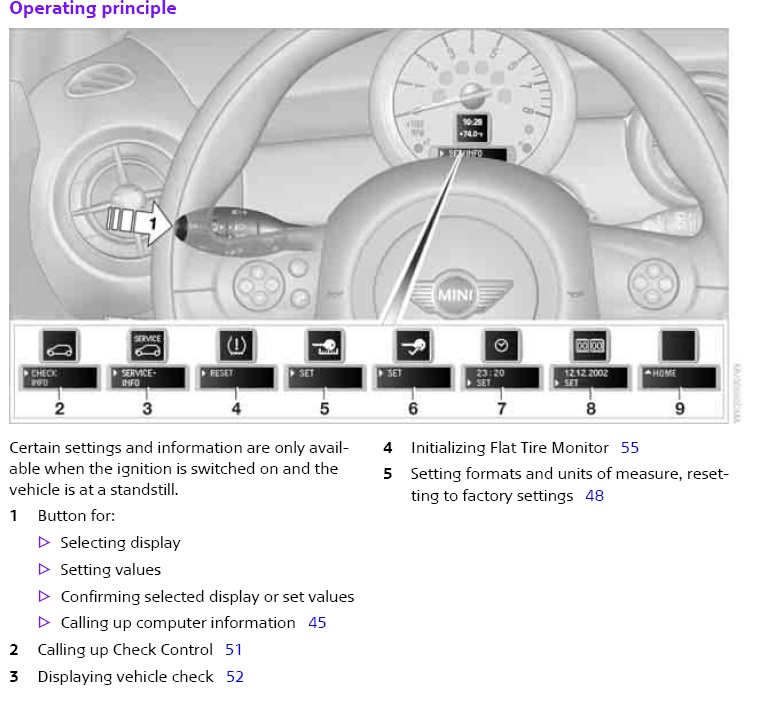
  3. Guarda queste 2 foto del manuale (che dovresti sempre leggere ):
Account

Navigation

Cerca

Cerca

Configure browser push notifications

Chrome (Android)
  1. Tap the lock icon next to the address bar.
  2. Tap Permissions → Notifications.
  3. Adjust your preference.
Chrome (Desktop)
  1. Click the padlock icon in the address bar.
  2. Select Site settings.
  3. Find Notifications and adjust your preference.