Classifica
-

marcello4895
Moderatore4Punti5.137Numero contenuti -

Pearl Jam
Utente forum3Punti324Numero contenuti -
felix_max.davide
Moderatore2Punti1.705Numero contenuti -
cippy
Admin2Punti29.001Numero contenuti



Contenuto Popolare
Mostra il contenuto con la massima reputazione di 21/05/2026 in tutte le aree
-
2 punti
-
2 punti
-
Grazie per averci informati. Purtroppo non sempre ci si ricorda di farlo.1 punto
-
1 punto
-
1 punto
-
1 punto
-
1 punto
-
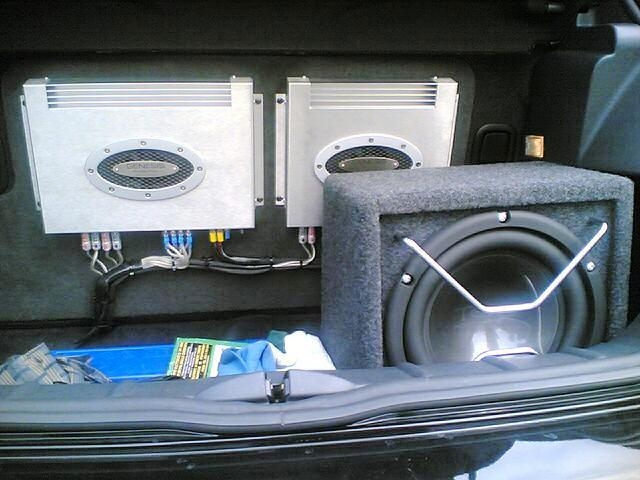
1 puntoquesto era il baule della mia S del 2003. tutto fatto da Car Audio Point Lissone c'era un ampli genesis profile 4 per il kit 2 via anteriorie technology, un Profile 2 a ponte per il sub technology, sorgente cd Nakamici...poi c'erano cavi, condensatore e un bel fusibile a completamento...suonava moooolto bene. quando serviva toglievo il sub e rimaneva il 2 vie anteriore (che comunque scendeva bene in basso)
 1 punto
 -
1 punto
-
1 punto
-
1 puntoBenvenuto! Auto completamente differenti... Ma a me piace anche la RR, da suo guidatore saltuario, di versione a gasolio1 punto
-
1 punto
-
0 punti