



GattoDelleNevi
Socio 2016
-
Iscritto
-
Ultima visita
Tutti i contenuti di GattoDelleNevi
-
@Rist Grazie rist, sei stato molto preciso... E hai confermato quello che penso della tua auto. :)Ne approfitto per chiedere se qualcuno conosce delle repliche (ovviamente 4x100 per la MINI) di questi cerchi che mi fanno impazzire.
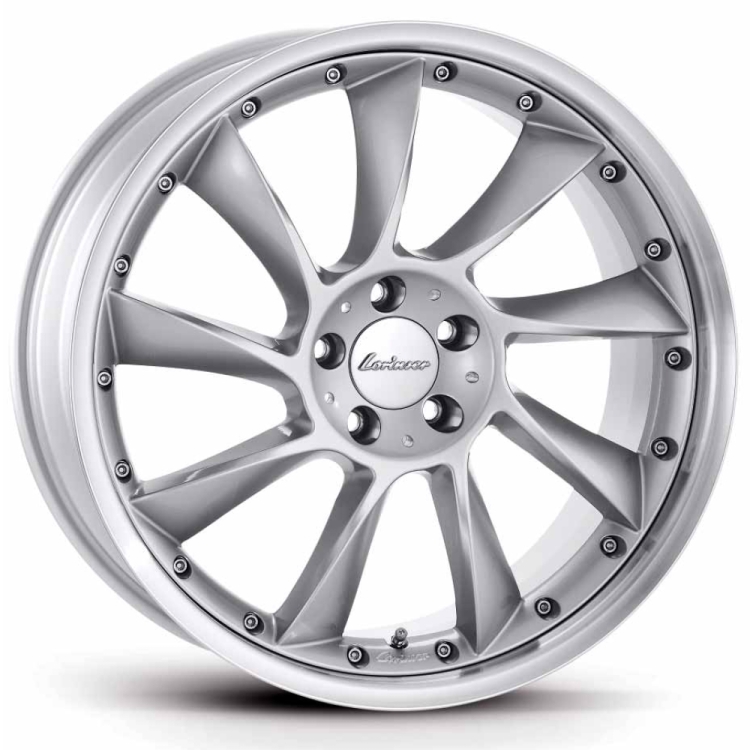 Esclusi i cerchi non mi dispiace.Benvenuto! Hai dimezzato i cilindri :D Ad ogni modo non ti dleuderà la mini ;)Qualcuno ha idea di dove trovare la capacità del proprio serbatoio? In rete non trovo nulla e sul libretto non è riportata. Guarda sue real oemComunque io ho gia espresso che non mi fanno impazzire manco gli originali... Sarò l'unico...
Account
Navigation
Cerca
Configure browser push notifications
Chrome (Android)
- Tap the lock icon next to the address bar.
- Tap Permissions → Notifications.
- Adjust your preference.
Chrome (Desktop)
- Click the padlock icon in the address bar.
- Select Site settings.
- Find Notifications and adjust your preference.
Safari (iOS 16.4+)
- Ensure the site is installed via Add to Home Screen.
- Open Settings App → Notifications.
- Find your app name and adjust your preference.
Safari (macOS)
- Go to Safari → Preferences.
- Click the Websites tab.
- Select Notifications in the sidebar.
- Find this website and adjust your preference.
Edge (Android)
- Tap the lock icon next to the address bar.
- Tap Permissions.
- Find Notifications and adjust your preference.
Edge (Desktop)
- Click the padlock icon in the address bar.
- Click Permissions for this site.
- Find Notifications and adjust your preference.
Firefox (Android)
- Go to Settings → Site permissions.
- Tap Notifications.
- Find this site in the list and adjust your preference.
Firefox (Desktop)
- Open Firefox Settings.
- Search for Notifications.
- Find this site in the list and adjust your preference.


