



GattoDelleNevi
Socio 2016
-
Iscritto
-
Ultima visita
Tutti i contenuti di GattoDelleNevi
-
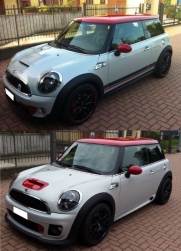 Grande! Anche la cornice dei finestrini? Mi dici come si smonta poi e quanto ti prende il carrozziere? :)
 -
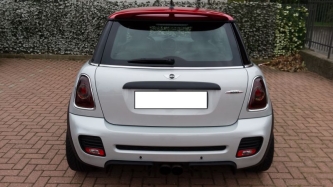 Esatto, purtroppo io non avendo il kit black line ce l'ho cromato, spero che oscurando i fari si noti meno..
 -
No no non ho paura che non si veda d'acceso! Anche perche vedo che è chiaro come oscuramento... Ero solo curioso di vederli da vicino ma da spenti! Perche quello che a me interessa è che non si veda la cornice cromata ;)
Spettacolo ora tocca alle cornici! ;)
Belli i fari oscurati, forse li faccio anche io! Posso chiederti un favore? faresti delle foto più da vicini ai fari? :)Benvenuto Riccardo!Mini Cooper SD R56 Ordinata il: intorno al 20/07/2013 Tempi consegna previsti: "agosto/settembre" (circa 30/40 giorni) Consegnata il: 30/08/2013, poco più di un mese. Data inizio produzione a Oxford: 15/072013.@ è la tua?Benvenuto Alessandro!Benvenuto Steo!
Account
Navigation
Cerca
Configure browser push notifications
Chrome (Android)
- Tap the lock icon next to the address bar.
- Tap Permissions → Notifications.
- Adjust your preference.
Chrome (Desktop)
- Click the padlock icon in the address bar.
- Select Site settings.
- Find Notifications and adjust your preference.
Safari (iOS 16.4+)
- Ensure the site is installed via Add to Home Screen.
- Open Settings App → Notifications.
- Find your app name and adjust your preference.
Safari (macOS)
- Go to Safari → Preferences.
- Click the Websites tab.
- Select Notifications in the sidebar.
- Find this website and adjust your preference.
Edge (Android)
- Tap the lock icon next to the address bar.
- Tap Permissions.
- Find Notifications and adjust your preference.
Edge (Desktop)
- Click the padlock icon in the address bar.
- Click Permissions for this site.
- Find Notifications and adjust your preference.
Firefox (Android)
- Go to Settings → Site permissions.
- Tap Notifications.
- Find this site in the list and adjust your preference.
Firefox (Desktop)
- Open Firefox Settings.
- Search for Notifications.
- Find this site in the list and adjust your preference.
