


D-Kaine
Utente forum
-
Iscritto
-
Ultima visita
Tutti i contenuti di D-Kaine
-
C'è qualcuno che l'ha fatto!!(christian cooperd ad esempio)!!!..puo però essere eliminato la parte inferiore..cioè quella dove si inserisce il cd e regola il volume!!..ovviamente va tagliata la perte centrale della plancia per fare spazio al nuovo stereo..!!..controlla nella gallery ci dovrebbero essere le foto dell'intervento!!...
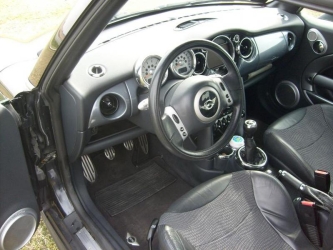 ma..hai il pomello cambio R56??!!!con il canale da 7,5 non ci sono problemi..non ci si accorge nemmeno che la gomma è leggermente tirata..!!..potresti però grattare i passaruota se monti un assetto molto basso...ma a quel punto li gratteresti anche con i 7!!...quindi con il canale da 7,5 non hai problemi!!!... Da 8 in poi sono cazzi!!!!!...
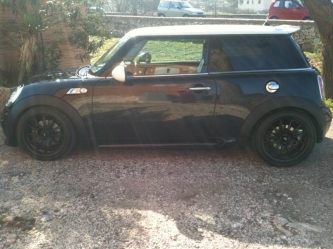 :post-8-1120395252: ......secondo me l'unica che monta è proprio quella posteriore...la forma mi sembra la stessa..l'unica cosa che cambia è il foro per i fendinebbia che nella Pre-Rest sono piu piccoli!!..L'ultimo in basso da quello che ho potuto vedere io è elettrosaldato al pannello...quindi non vedo come si possa togliere se non staccandolo....!!!..il dubbio che mi viene è come rimettere il nuovo!!!...il pezzo nuovo ha delle clips??!!..
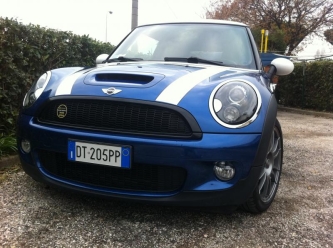 guazzolino...listelli in tinta!!!!
 complimentissimi!!..è esattamente come la farei io!!...manca solo il tetto nero!!...veramente stupenda!bravo!i pre rest con freccia bianca esistono anche originali...ma costano!!!..li fanno anche replica ma sono difficilissima da trovare!!!...
Account
Navigation
Cerca
Configure browser push notifications
Chrome (Android)
- Tap the lock icon next to the address bar.
- Tap Permissions → Notifications.
- Adjust your preference.
Chrome (Desktop)
- Click the padlock icon in the address bar.
- Select Site settings.
- Find Notifications and adjust your preference.
Safari (iOS 16.4+)
- Ensure the site is installed via Add to Home Screen.
- Open Settings App → Notifications.
- Find your app name and adjust your preference.
Safari (macOS)
- Go to Safari → Preferences.
- Click the Websites tab.
- Select Notifications in the sidebar.
- Find this website and adjust your preference.
Edge (Android)
- Tap the lock icon next to the address bar.
- Tap Permissions.
- Find Notifications and adjust your preference.
Edge (Desktop)
- Click the padlock icon in the address bar.
- Click Permissions for this site.
- Find Notifications and adjust your preference.
Firefox (Android)
- Go to Settings → Site permissions.
- Tap Notifications.
- Find this site in the list and adjust your preference.
Firefox (Desktop)
- Open Firefox Settings.
- Search for Notifications.
- Find this site in the list and adjust your preference.