silverboy
Socio 2015
-
Iscritto
-
Ultima visita
Tutti i contenuti di silverboy
-
giorno ragazzi
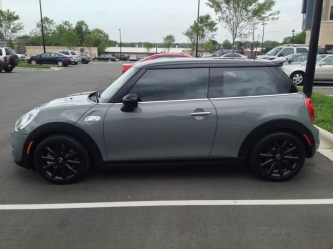 bella bella!!ù ma il lit luci american ha il vetro dietro arancio o rosso?metti il nuovo e in base alle disp. economiche valuti una tra queste cose dp o mappa o centrale! ma anke qui ogni macchina è diversa e reagisce in modo diversola seconda e la forge è a bisogno del tubicino di depressione che forniscono essendo pneumatica che pero sull'originale non c'è , infatti ti danno anke il barilotto cromato con cui devi sostituire anke l'altra valvola! mentre bonalume e uguale all'originale ma elettronicamassi scimmia per exo 2!! visto qualke test e l'effetto che da non facendo appiccicare lo sporco !! da sbavo, costerà un pelo di + ma per 1 anno e mezzo la lavi e basta senza sbatti anke alle lance dei self
 azz!! cosa è successoil delirio c'è!!
Account
Navigation
Cerca
Configure browser push notifications
Chrome (Android)
- Tap the lock icon next to the address bar.
- Tap Permissions → Notifications.
- Adjust your preference.
Chrome (Desktop)
- Click the padlock icon in the address bar.
- Select Site settings.
- Find Notifications and adjust your preference.
Safari (iOS 16.4+)
- Ensure the site is installed via Add to Home Screen.
- Open Settings App → Notifications.
- Find your app name and adjust your preference.
Safari (macOS)
- Go to Safari → Preferences.
- Click the Websites tab.
- Select Notifications in the sidebar.
- Find this website and adjust your preference.
Edge (Android)
- Tap the lock icon next to the address bar.
- Tap Permissions.
- Find Notifications and adjust your preference.
Edge (Desktop)
- Click the padlock icon in the address bar.
- Click Permissions for this site.
- Find Notifications and adjust your preference.
Firefox (Android)
- Go to Settings → Site permissions.
- Tap Notifications.
- Find this site in the list and adjust your preference.
Firefox (Desktop)
- Open Firefox Settings.
- Search for Notifications.
- Find this site in the list and adjust your preference.