Tommy86
Utente forum
-
Iscritto
-
Ultima visita
Tutti i contenuti di Tommy86
-
Benvenuto...è solo l'Inizio! :pilotar:
-
Ragà scusate la mia domanda...io nella mia ho il CDB però vorrei tanto che oltre a visionare le solite cose si riuscisse a visionare anche la Temperatura dell'Olio..Facendo il procedimento del Video e quindi "attivando" la voce numero 7,ogni qual volta che premo il pulsante del CDB assieme alle solite informazioni,apparirà anche la Temperatura Olio?Ragazzi toglietemi questo dubbio...Nel CDB c'è una voce che dice ANABBAGLIANTI DIURNI ATTIVI e relativa opzione ON oppure OFF..Ho notato che sulla mia è impostato su ON...La mia monta il pacchetto Visibility Blueberry quindi Sensore Crepuscolare con Fari Bi-Xeno..Il sensore crepuscolare sinceramente non l'ho mai visto funzionare..ogni volta che accendo la macchina di giorno(quando in teoria gli anabbaglianti non dovrebbero accendersi) tutto si accende indifferentemente dalla luce esterna..Forse quell'opzione nel CDB (messo su ON) serve proprio ad escludere il funzionamento del sensore crepuscolare e quindi gli Anabbaglianti si accendono anche di giorno?
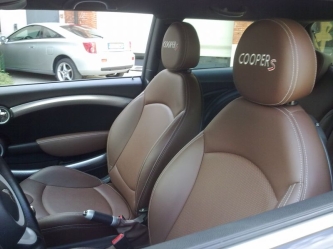 Ciao scusa se ti chiedo...dove hai fatto rivestire i sedili??
 Bella giornata...ovviamente senza dimenticare l'avventura "Telepass" mia e di Marco... :P
Account
Navigation
Cerca
Configure browser push notifications
Chrome (Android)
- Tap the lock icon next to the address bar.
- Tap Permissions → Notifications.
- Adjust your preference.
Chrome (Desktop)
- Click the padlock icon in the address bar.
- Select Site settings.
- Find Notifications and adjust your preference.
Safari (iOS 16.4+)
- Ensure the site is installed via Add to Home Screen.
- Open Settings App → Notifications.
- Find your app name and adjust your preference.
Safari (macOS)
- Go to Safari → Preferences.
- Click the Websites tab.
- Select Notifications in the sidebar.
- Find this website and adjust your preference.
Edge (Android)
- Tap the lock icon next to the address bar.
- Tap Permissions.
- Find Notifications and adjust your preference.
Edge (Desktop)
- Click the padlock icon in the address bar.
- Click Permissions for this site.
- Find Notifications and adjust your preference.
Firefox (Android)
- Go to Settings → Site permissions.
- Tap Notifications.
- Find this site in the list and adjust your preference.
Firefox (Desktop)
- Open Firefox Settings.
- Search for Notifications.
- Find this site in the list and adjust your preference.