Vai al contenuto
View in the app

A better way to browse. Learn more.

mega MINI forum

A full-screen app on your home screen with push notifications, badges and more.

To install this app on iOS and iPadOS
  1. Tap the Share icon in Safari
  2. Scroll the menu and tap Add to Home Screen.
  3. Tap Add in the top-right corner.
To install this app on Android
  1. Tap the 3-dot menu (⋮) in the top-right corner of the browser.
  2. Tap Add to Home screen or Install app.
  3. Confirm by tapping Install.

Saluti dalla Corea

Featured Replies

Inviato

Buon giorno, mi chiamo Giacomo, vivo in Corea del Sud. 
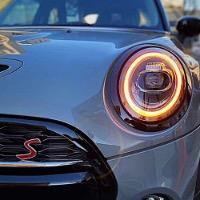
Ho ricevuto da poco la mia F55 Couper S moonwalk gray.


Ho letto alcuni topic molto interessanti ed ho deciso di iscrivermi.


Al momento sono molto interessato ad avere informazioni riguardo Apple Carplay in full screen ed altre funzionalità ed accessori per amici a 4 zampe.


Grazie

015E35BE-A970-4C40-99E4-0AC1965CBB99.jpeg

CBE014FA-6153-4EC3-B1CD-8994786BB72F.jpeg

DC82D95F-1537-42F4-987C-E9AA933F8EB7.jpeg

Inviato

Benvenuto!

Inviato

Benvenuto a te e alla tua MINI.


당신과 당신의 미니에 오신 것을 환영합니다. +vocale tramite Google Traslate: dangsingwa dangsinui minie oisín geoseul hwanyeonghapnida.

Inviato

Benvenuto!

Inviato

Benvenuto!

Account

Navigation

Cerca

Cerca

Configure browser push notifications

Chrome (Android)
  1. Tap the lock icon next to the address bar.
  2. Tap Permissions → Notifications.
  3. Adjust your preference.
Chrome (Desktop)
  1. Click the padlock icon in the address bar.
  2. Select Site settings.
  3. Find Notifications and adjust your preference.