


Thirdeye
Socio 2014
-
Iscritto
-
Ultima visita
Tutti i contenuti di Thirdeye
-
Guarda, se non cambi la puleggia risparmiati pure la mappatura, soprattutto quella di una works. Poi tra l'altro io non sarei così tranquillo a caricare una mappa jcw, più che altro per via dei diversi iniettori... Se vuoi guadagnare qualcosa in termini di prestazioni, vai di puleggia ridotta!Altrimenti se vuoi spendere almeno 700 euro solo per fare un pò più di rumore e per avere gli accessori jcw...beh, fallo pure ma non aspettarti aumenti tangibili in termini di prestazioni! :post-8-1120393919:
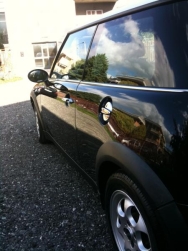 Ben fatta!Se cerchi su internet c'è il programma "mini-regeneration" e ti fanno alcuni interventi di manutenzione a prezzi abbastanza contenuti. http://www.mini.it/minire-generation/ Secondo me se vai dal tuo meccanico di fiducia comunque risparmi ancora qualcosa. Pardon, non avevo notato che hai una r56...dubito che includano anche quella nel regeneration...comunque il prezzo sarà indicativamente quello.Qualche cuscinetto?Quindi l'hai presa rossa, come in firma?Senza parole...complimenti davvero!
 Cippy secondo me chili red è bellissima...ma vuoi prenderne 2 dello stesso colore?! Dai dai cambia :post-8-1120395257: Tutta nera tra le opzioni che hai messo! Altrimenti brg!Qualcuno sa dirmi qual'è su etk il sensore e dove si trova? Grazie
Account
Navigation
Cerca
Configure browser push notifications
Chrome (Android)
- Tap the lock icon next to the address bar.
- Tap Permissions → Notifications.
- Adjust your preference.
Chrome (Desktop)
- Click the padlock icon in the address bar.
- Select Site settings.
- Find Notifications and adjust your preference.
Safari (iOS 16.4+)
- Ensure the site is installed via Add to Home Screen.
- Open Settings App → Notifications.
- Find your app name and adjust your preference.
Safari (macOS)
- Go to Safari → Preferences.
- Click the Websites tab.
- Select Notifications in the sidebar.
- Find this website and adjust your preference.
Edge (Android)
- Tap the lock icon next to the address bar.
- Tap Permissions.
- Find Notifications and adjust your preference.
Edge (Desktop)
- Click the padlock icon in the address bar.
- Click Permissions for this site.
- Find Notifications and adjust your preference.
Firefox (Android)
- Go to Settings → Site permissions.
- Tap Notifications.
- Find this site in the list and adjust your preference.
Firefox (Desktop)
- Open Firefox Settings.
- Search for Notifications.
- Find this site in the list and adjust your preference.