


Pablo
Utente forum
-
Iscritto
-
Ultima visita
Tutti i contenuti di Pablo
-
ma ci vogliono le gomme speciali per 'sti specie di cerchi? sembrano deformate :post-8-1120395257:
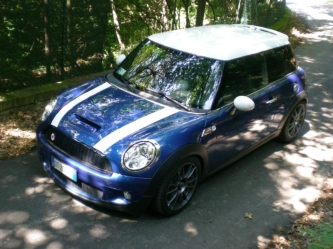 :new_31:
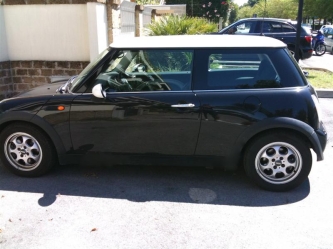 a me pacciono un sacco quei cerchi! Hanno un che di Old Style... :post-8-1120393919:il pulsante a lato della leva delle frecce per cambiare le fnzioni c'è anche se non c'è il cdb?
 spero fosse solo a dorso nudo e nient'altro :post-8-1120395070:qualcosa non va nel mesaggio alex...ho rifatto il pieno: avevo fatto 719 km e ho messo 37.1 litri 19.4 km/l al risparmio ho fatto solo gli ultimi 50-60km perchè ero a bologna e volevo arrivare a ferrara dal distributore solito in cui faccio rifornimento...beh, quando al riporti per la garanzia fa notare che le 70 euro devono essere comprese nella garanzia e prova a farti rimborsare, anche una telefonata a miniitalia per chiarimenti potresti farla...funziona anche quello in italiano su mini.com/itbenccvenuto!dicono non sia così complicato, se non trovi dovresti riuscire anche da solola mia è nuova, meno di 10k km ma in confronto all'astra familiare di prima è muta sta macchina...benvenuto!mettete qualche foto esplicativa dei kit montati!
Account
Navigation
Cerca
Configure browser push notifications
Chrome (Android)
- Tap the lock icon next to the address bar.
- Tap Permissions → Notifications.
- Adjust your preference.
Chrome (Desktop)
- Click the padlock icon in the address bar.
- Select Site settings.
- Find Notifications and adjust your preference.
Safari (iOS 16.4+)
- Ensure the site is installed via Add to Home Screen.
- Open Settings App → Notifications.
- Find your app name and adjust your preference.
Safari (macOS)
- Go to Safari → Preferences.
- Click the Websites tab.
- Select Notifications in the sidebar.
- Find this website and adjust your preference.
Edge (Android)
- Tap the lock icon next to the address bar.
- Tap Permissions.
- Find Notifications and adjust your preference.
Edge (Desktop)
- Click the padlock icon in the address bar.
- Click Permissions for this site.
- Find Notifications and adjust your preference.
Firefox (Android)
- Go to Settings → Site permissions.
- Tap Notifications.
- Find this site in the list and adjust your preference.
Firefox (Desktop)
- Open Firefox Settings.
- Search for Notifications.
- Find this site in the list and adjust your preference.