ivan!
Utente forum
-
Iscritto
-
Ultima visita
Tutti i contenuti di ivan!
-
stesso identico problema è un gommino di un sensore che sta dietro hai radiatori sul blocco difficile da arrivarci x via del poco spazio :closedeyes: ma credo che su per giu sia quello
-
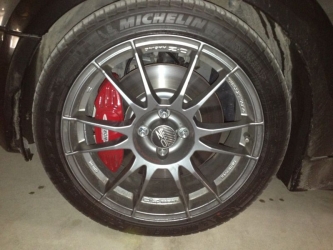 belliiiiiiiiii :)
-
è la valvola by pass a vederla sembra buona
-
benvenuto :)
-
che differenziale c'e ora l'originale della gp?il posteriore r53/56 ha sti stessi attacchi :)benvenuto.. che minella :)
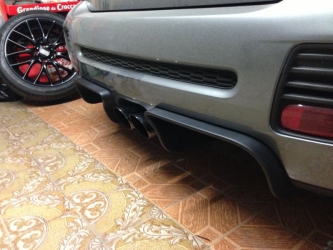 monda sempre al top... :2-2:quoto in pieno ale le avevo anche io e non fischiavano e non ho notato molta differenza a freddo rispetto alle stock la usavo tranquillamente senza paura.. le ds3000 si nota la differenza a freddo di conseguenza è una pasta corsaiola--le hai messe alla fine le boccole o hai rinunciato?benvenuto.... la honda la hai tutta originale ? :) bel mezzo...si le montavo vanno alla grande :)ma hai montato i freni cooper s r53 o 56?
Account
Navigation
Cerca
Configure browser push notifications
Chrome (Android)
- Tap the lock icon next to the address bar.
- Tap Permissions → Notifications.
- Adjust your preference.
Chrome (Desktop)
- Click the padlock icon in the address bar.
- Select Site settings.
- Find Notifications and adjust your preference.
Safari (iOS 16.4+)
- Ensure the site is installed via Add to Home Screen.
- Open Settings App → Notifications.
- Find your app name and adjust your preference.
Safari (macOS)
- Go to Safari → Preferences.
- Click the Websites tab.
- Select Notifications in the sidebar.
- Find this website and adjust your preference.
Edge (Android)
- Tap the lock icon next to the address bar.
- Tap Permissions.
- Find Notifications and adjust your preference.
Edge (Desktop)
- Click the padlock icon in the address bar.
- Click Permissions for this site.
- Find Notifications and adjust your preference.
Firefox (Android)
- Go to Settings → Site permissions.
- Tap Notifications.
- Find this site in the list and adjust your preference.
Firefox (Desktop)
- Open Firefox Settings.
- Search for Notifications.
- Find this site in the list and adjust your preference.